

July 2026 source check: verify the doorbell, wiring, settings, and plan
SimpliSafe’s current support material still identifies this product as the Video Doorbell Pro. Its requirements page, updated June 24, 2026, says it is designed to replace an existing wired doorbell with a mechanical chime; a home without doorbell wiring needs wiring installed first. The company’s current motion-detection page says the doorbell uses video analytics and passive infrared sensing, while its settings page lists app-controlled options such as Activity Zones and Video Quality.
Those pages confirm current support topics, not the price or feature state of every account. Treat older prices and plan names elsewhere on this page as historical unless they match the dated cart and plan terms shown to you. Save the exact hardware revision, price, tax, plan, recording, detection, cancellation, return, warranty, and support terms before buying.
Doorbell fit and wiring record
| Job | Evidence to record | Failure to test |
|---|---|---|
| Existing doorbell circuit | Transformer rating, measured voltage, wiring condition, chime type, chime compatibility, breaker, and installer | Low voltage, heat, buzzing, repeated restart, no chime, and breaker restoration |
| Mount and physical view | Door side, height, angle, wedge, weather exposure, face and package route, neighboring boundary, and tamper resistance | Backlight, porch light, rain, glare, night IR reflection, hidden package, and easy removal |
| Network path | Access point, band, signal at the final mount, upload capacity, congestion, isolation rules, account, and recovery owner | Internet loss, access-point restart, changed Wi-Fi credentials, weak signal, and account lockout |
| Alarm-system relationship | Exact Base Station or account need, arming behavior, alarm event path, monitoring tier, verification permission, contacts, and history | Doorbell offline during alarm, camera unavailable to the owner, monitoring not authorized, and plan ended |
Measure video evidence instead of quoting camera specs
- Walk the real visitor, package, porch, driveway, and street routes by day, at dusk, and at night. Save the first frame that identifies the event rather than the sharpest later frame.
- Record motion start, alert time, recording start, face and package visibility, audio, timestamp, clip length, missing seconds, playback, export, and event history.
- Test a slow approach, fast approach, person leaving, package remaining, package removal, hood or hat, backlight, porch light, rain, and a vehicle headlight.
- Set the physical view first, then Activity Zones and sensitivity. A software zone does not make an intrusive physical view private.
- Repeat after changing video quality, Wi-Fi conditions, plan state, and notification settings. Save the result and the setting that produced it.
Plan, recording, and monitoring worksheet
Write the permanent unpaid state and every paid state separately. For each, record live view, doorbell press, two-way audio, motion alert, person or other detection, recording, history, retention, download, sharing, multiple users, warranty, support, alarm verification, monitoring-center access, and emergency response. Confirm which plan owns each feature and what happens on cancellation.
A video alert, stored clip, live view, monitoring-center review, household call, cancellation attempt, emergency call, and dispatch are separate stages. Use the provider-approved test method and confirm the event, address, contacts, permit, false-alarm rule, cancellation route, and restoration.
Privacy, users, and account recovery
List owners, residents, children or restricted users, guests, installers, support agents, monitoring contacts, shared viewers, billing owners, old phones, and recovery methods. Record who can view live video, hear or speak, change zones, download clips, change plans, share access, remove users, reset the device, or recover the account.
Add and remove a temporary user. Prove old app sessions, invitations, shared links, saved media, monitoring permissions, and recovery routes fail. Check audio and camera rules for the property and keep bedrooms, bathrooms, neighboring windows, and shared private areas outside the physical view.
Compare the full front-door job
Use the video-doorbell buying guide for power, evidence, plans, privacy, and cost. If Apple Home is required, use the HomeKit video-doorbell checklist and verify the exact model, supported features, hub path, recording service, and account roles. If a battery route and optional alarm stack are preferable, compare Abode’s Wireless Video Doorbell against the same physical view, alert timing, recording, unpaid state, users, failures, and three-year cost.
40-minute Video Doorbell Pro acceptance test
- Photograph the transformer, chime, wiring, mount, final physical view, network result, model label, account owner, plan, and support record.
- Press the button and walk every route 10 times by day and in low light. Save alert, first useful frame, recording start, audio, timestamp, retention, playback, and export results.
- Test Activity Zones, sensitivity, video quality, chime, two-way audio, owner, resident, restricted user, removed user, and a recovered account.
- Disconnect internet safely and restart the documented network and doorbell path. Record button, chime, live view, alert, recording, history, alarm relation, missed events, and restoration.
- Run the provider-approved alarm and monitoring test if purchased. Confirm each stage from local event through monitoring receipt, contact, cancellation, and restoration.
- Reprice hardware, wiring, plan, monitoring, batteries or replacements, support, and tax for normal ownership, one failed device, cancellation, and a move over three years.
SimpliSafe Video Doorbell Pro: Great Hardware, Frustrating Ecosystem Lock-In
Last Updated: March 2026 | Rating: 3.5/5
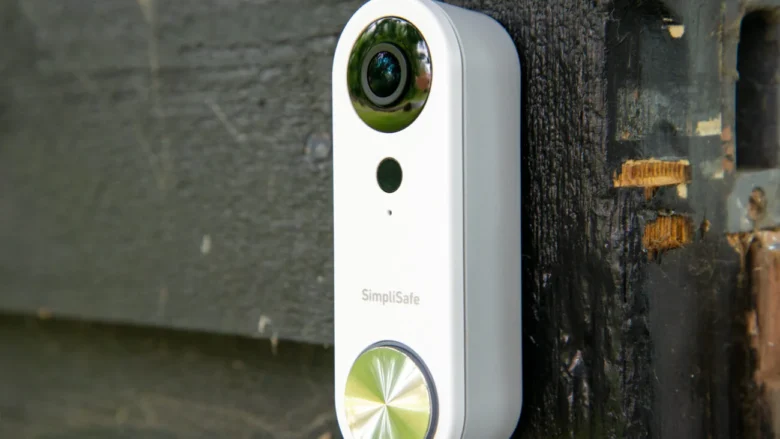
The SimpliSafe Video Doorbell Pro is a wired doorbell camera with HDR video, a 164-degree wide-angle lens, and a sharp 1080p picture. On paper, it competes well with the Ring Video Doorbell and other mid-range options. In practice, it has one critical limitation that buyers need to know about.
Key Specs
| Feature | SimpliSafe Video Doorbell Pro |
|---|---|
| Price | $169.99 |
| Resolution | 1080p HDR |
| Field of View | 164° wide-angle |
| Installation | Wired only (existing doorbell wiring required) |
| Night Vision | Yes (infrared) |
| Two-Way Audio | Yes |
| Motion Detection | Yes, with adjustable zones |
| Smart Home | No Alexa, No Google, No HomeKit |
| Subscription | Required — $9.99/mo (Fast Protect Interactive) or higher |
What We Like
- Excellent HDR video quality — Handles mixed lighting (shadows + bright sky) better than most sub-$200 doorbells. Faces are clear even in backlit conditions.
- Wide 164° field of view — Captures porch, steps, and part of the walkway without a fisheye distortion effect.
- Clean design — Slim, modern look that doesn’t scream “security camera” like some bulkier alternatives.
- Easy wired installation — If you have existing doorbell wiring, setup takes about 15 minutes with clear in-app instructions.
- Good integration with SimpliSafe system — If you already have a SimpliSafe alarm system, the doorbell slots right into the app and can trigger alarm events.
What We Don’t Like
- No Alexa or Google Assistant support — This is the dealbreaker for many. You can’t view the doorbell on an Echo Show, Google Nest Hub, or use voice commands. In 2026, this is a significant gap when Ring, Abode, and even budget brands support multiple voice platforms.
- $10/month subscription required for video — Without a plan, you get no video recording, no cloud clips, no person detection. The doorbell is essentially a fancy doorbell without paying monthly.
- Wired only — No battery option. If you don’t have existing doorbell wiring, you’re out of luck (or paying an electrician).
- No local storage — Everything is cloud-dependent. No microSD slot, no NAS recording option.
- No HomeKit support — Apple users are completely locked out. Systems like Abode offer full HomeKit Secure Video integration.
How It Compares
| Feature | SimpliSafe Doorbell Pro | Ring Video Doorbell 4 | Abode Cam 2 |
|---|---|---|---|
| Price | $169.99 | $199.99 | $44.99 |
| Resolution | 1080p HDR | 1080p HDR | 2K |
| Alexa | ❌ | ✅ | ✅ |
| ❌ | ✅ | ✅ | |
| HomeKit | ❌ | ❌ | ✅ (HKSV) |
| Monthly Plan | $9.99+ | $3.99+ | Free (local) / $6.99 |
| Local Storage | ❌ | ❌ | ✅ (microSD) |
3-Year Cost of Ownership
The true cost of a video doorbell isn’t just the sticker price — it’s what you pay over 3 years including mandatory subscriptions. Here’s how the SimpliSafe Video Doorbell Pro stacks up:
| Cost Component | SimpliSafe Doorbell Pro | Ring Video Doorbell 4 | Abode Cam 2 |
|---|---|---|---|
| Equipment | $169.99 | $199.99 | $44.99 |
| Required Plan | $9.99/mo (Interactive) | $3.99/mo (Basic) | $0 (free local storage) |
| 3-Year Subscription | $359.64 | $143.64 | $0 |
| 3-Year Total | $529.63 | $343.63 | $44.99 |
The SimpliSafe doorbell costs nearly 12x more than the Abode Cam 2 over 3 years — and Abode gives you 2K resolution, HomeKit Secure Video, and local microSD storage without paying a cent monthly. Even Ring is $186 cheaper over the same period. The subscription requirement makes the SimpliSafe doorbell one of the most expensive options in its class.
SimpliSafe Doorbell in 2026: What’s New
SimpliSafe has made some changes to its doorbell lineup this year:
- Package detection added — The doorbell now distinguishes between people, vehicles, and packages. Package alerts notify you separately, reducing false alarm fatigue from passing cars and pedestrians. This was a long-requested feature that brings SimpliSafe closer to Ring’s detection capabilities.
- Fast Protect video verification — When paired with a SimpliSafe alarm system on the Core plan ($32.99/mo), the doorbell camera can be used for live video verification during alarm events. Monitoring agents view your camera feed to confirm threats before dispatching police. A genuine differentiator, though the $33/month price tag is steep.
- Still no Alexa, Google, or HomeKit — This remains the doorbell’s biggest weakness. In a market where even $40 cameras support voice assistants, SimpliSafe’s $170 doorbell still operates in complete isolation from every smart home ecosystem. No voice commands, no Echo Show streaming, no HomeKit automations.
- Subscription still mandatory — You still need at minimum the Standard plan ($22.99/mo) to access any video features. Without a subscription, the doorbell is essentially a fancy intercom with no recording. The Abode Cam 2 stores video locally on a microSD card for $0/month.
Our take: Package detection and video verification are welcome additions, but they don’t fix the fundamental problem: a $170 doorbell that only works within one ecosystem and requires $23-33/month to function. For standalone doorbell shopping, look at Ring ($100, Alexa), Abode Cam 2 ($35, HomeKit), or Reolink ($80, local storage).
Who Should Buy It
Buy the SimpliSafe Video Doorbell Pro if you already own a SimpliSafe system and want a matching doorbell in the same app. The video quality is genuinely good, and it integrates cleanly with SimpliSafe’s alarm.
Skip it if you use Alexa, Google Assistant, or HomeKit — or if you don’t want to pay $10/month just to see who’s at your door. In that case, the Abode Cam 2 offers 2K resolution, HomeKit Secure Video, local storage, and a lower monthly cost — or consider a Ring doorbell for the best Alexa integration.
Verdict: 3.5/5
The SimpliSafe Video Doorbell Pro has strong video quality and a clean design, but in 2026, the lack of any smart home platform support is hard to justify at $170 + $10/month. It’s a solid add-on for existing SimpliSafe users and a poor standalone choice for everyone else.
Related Reviews
SimpliSafe Coverage
- SimpliSafe Review 2026 — Full system review including plans, pricing, and alternatives
- SimpliSafe vs Alder 2026 — No-contract DIY vs contract lock-in comparison — see also our best no-contract systems
- Cove vs SimpliSafe 2026 — Two budget DIY systems side by side
Doorbell & Camera Alternatives
- Abode Security Hub Review 2026 — DIY alternative with HomeKit, free self-monitoring, and local storage
- Ring Alarm Review 2026 — Amazon ecosystem doorbells and alarm bundles
- Eufy Cameras Review 2026 — Local storage, no subscription cameras
- Best HomeKit Security Cameras 2026 — Top picks for Apple Home users
Competitor Reviews
- Abode Review 2026 — Best HomeKit-compatible alternative with free self-monitoring
- ADT Review 2026 — Pro-install option with full monitoring
- Cove Review 2026 — Budget-friendly monitored alternative
- Vivint Review 2026 — Premium integrated cameras and smart home
- Blink Review 2026 — Low-cost camera-first Amazon option
- Frontpoint Review 2026 — Alarm.com dealer at $45/month
Buying Guides
- Best Smart Home Security Systems — HomeKit, Alexa & Google platform comparison
- Best No-Contract Security Systems 2026 — Systems that work without a subscription
- Best HomeKit Home Security Systems — Which alarms work with Apple Home
- Home Security Cameras Guide — Everything about choosing the right camera
- Home Security for Renters — Portable, landlord-friendly options
- DIY vs Professional Security Systems — Comparison guide
FAQ
Does the SimpliSafe Video Doorbell Pro work with Alexa?
No. As of 2026, SimpliSafe’s doorbell does not support Amazon Alexa, Google Assistant, or Apple HomeKit. You can only view footage through the SimpliSafe app.
Can I use the SimpliSafe doorbell without a subscription?
Technically yes, but it’s severely limited — no video recording, no cloud clips, no smart alerts. You’d only get live view and basic motion alerts. The $9.99/mo Interactive plan is effectively required.
Is the SimpliSafe doorbell better than Ring?
The video quality is comparable, but Ring offers Alexa support, a cheaper subscription ($3.99/mo), and battery-powered options. Ring is the better standalone doorbell; SimpliSafe’s doorbell only makes sense within a SimpliSafe system. For an alternative with HomeKit support, check Abode.
What are the best alternatives to the SimpliSafe Video Doorbell Pro?
The top alternatives in 2026 are the Ring Video Doorbell 4 ($199, best Alexa integration), the Abode Cam 2 ($44.99, best value with 2K video, HomeKit, and local storage), and the Google Nest Doorbell ($179, best Google Home integration). If you want a doorbell that works without a monthly subscription, Abode is the strongest option with free local recording via microSD.
Last updated: March 2026
Related Comparisons & Guides
- Ring Review 2026 — strongest Alexa doorbell ecosystem
- eufy Cameras Review 2026 — no-subscription local storage alternative
- Best HomeKit Security Cameras 2026 — Apple-first options
- Best Google Home Security Systems 2026 — Assistant-compatible picks
- SimpliSafe Review 2026 — full system costs, plans, and limitations
- Best Smart Locks 2026 — pair your doorbell with the right smart lock
- Best No-Contract Security Systems 2026 — alternatives without lock-in
Last updated: March 2026
Related Video Doorbell Alternatives
2026 update: video doorbell buyer-fit checklist
- Test motion-trigger reliability and package-detection consistency at your actual porch angle before committing.
- Confirm battery vs wired power behavior and recharging cadence under heavy event volume.
- Compare 36-month ownership including cloud video storage, replacement batteries, and add-on chimes.
Related reads: Best video doorbell cameras and Ring vs Abode 2026.
2026 refresh: video doorbell subscription and alarm-stack checkpoint
- Check video storage costs: a doorbell can look cheap up front but become expensive once cloud history, smart detection, and alarm monitoring are added.
- Pair doorbell alerts with entry sensors: video helps identify visitors, but a full alarm stack should still cover doors, windows, sirens, and backup alerts.
- Compare ecosystem lock-in: review whether the doorbell works best only inside one brand’s app or whether it fits your broader alarm and smart-home setup.
Related reads: Ring vs SimpliSafe, best security cameras without a subscription, and best no-subscription home security systems.
2026 internal links: vacation homes, mailbox/package zones, pool gates, and smart locks 11
- Best security systems for vacation homes — compare cameras, leak sensors, smart locks, and remote alerts.
- Best systems for mailbox and package zones — cover delivery areas with cameras, lighting, and alerts.
- Best systems for pool gates — compare alerts, cameras, lighting, and family safety rules.
- Best smart locks for home security — compare codes, app roles, activity history, and access removal.
June 2026 update: video doorbell buying path
Quick take: a video doorbell should not be the whole security plan. It covers the front door, but it does not protect patio doors, garage entries, side gates, or lower-level windows. Treat it as one layer inside a broader alarm and camera setup.
- Compare the full system: use Ring vs SimpliSafe if you are choosing between doorbell-first security and a broader DIY alarm setup.
- Renter setup: check no-subscription systems for renters if drilling or monthly fees are the blockers.
- Townhome setup: use the townhome security guide if the doorbell points toward shared walkways or neighbors.
- Smart lock pairing: pair any doorbell with the townhome smart lock guide when guest codes or keypad access matter.
- No-fee option: compare no-subscription home security systems before committing to cloud video plans.
Sources checked for this update: SimpliSafe, Ring, and Apple Home pages.
June 2026 next reads for doorbell shoppers
If you are comparing the SimpliSafe Video Doorbell Pro, do not judge it on camera specs alone. The better buying question is whether you want a doorbell inside one alarm ecosystem, a broader DIY security setup, or a no-subscription front-porch layer.
- No-subscription front porch systems for buyers who want package alerts without a monthly plan.
- HomeKit front porch security for Apple Home households choosing cameras, lights, and sensors.
- Ring vs SimpliSafe for buyers comparing camera-first and alarm-first ecosystems.
- Abode review for shoppers who want flexible sensors, cameras, smart-home integrations, and optional monitoring.