
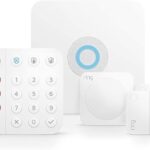
Ring Alarm Review 2026 Update: Equipment, Monitoring, Cameras, and Cost
Last Updated: March 2026 | Rating: 3.5/5
Ring Alarm is Amazon’s DIY home security system, and it’s everywhere — affordable hardware, easy setup, and deep Alexa integration make it one of the most popular options on the market. But Ring’s shift to a subscription-heavy model (you now need Ring Home for most useful features) has frustrated longtime users. Is it still a good deal in 2026?
Quick Specs
| Feature | Details |
|---|---|
| Base Kit Price | $199 (8-piece) |
| Monthly Plans | Ring Home Basic $5/mo, Plus $10/mo, Pro+ $20/mo |
| Professional Monitoring | Yes (Plus and Pro+ plans) |
| Contract | No contract required |
| Cellular Backup | Plus and Pro+ plans only |
| Smart Home | Alexa (deep), Google Home (limited), no HomeKit |
| Camera Ecosystem | 15+ Ring cameras, doorbells, floodlights |
| AI Detection | Person, vehicle, pet, package (Plus+ plans) |
| Installation | DIY — peel-and-stick sensors |
| Warranty | 1 year limited |
What Ring Does Well
- Massive camera ecosystem — More camera options than any competitor. Doorbells, indoor, outdoor, floodlights, Stick Up Cams — Ring has a camera for every angle of your home.
- Dead-simple setup — The 8-piece kit installs in under 30 minutes with peel-and-stick sensors. The app walks you through every step.
- Alexa integration — If you’re in the Amazon ecosystem, Ring is the most deeply integrated security option. “Alexa, arm Ring” works flawlessly.
- Affordable entry point — The base kit at $199 with plans starting at $5/month is one of the cheapest ways to get a monitored alarm system.
- Neighborhood alerts — Ring’s community feature shares local crime reports and camera footage, adding a social layer to home security.
Where Ring Falls Short
- Subscription creep — Ring has progressively moved features behind paywalls. In 2026, you need at least the Plus plan ($10/mo) for cellular backup and useful camera features. The free tier is nearly useless.
- No HomeKit support — Despite years of requests, Ring still doesn’t support Apple HomeKit. If you’re an Apple household, look at Abode instead.
- Privacy concerns — Amazon’s data practices and Ring’s history of sharing footage with law enforcement (without warrants in some cases) remain a concern for privacy-conscious users.
- No Z-Wave/Zigbee hub in base kit — The alarm system itself doesn’t act as a smart home hub the way Abode or SmartThings does.
- Camera quality is mid-range — While the ecosystem is huge, individual camera specs (1080p on most models) lag behind premium options from Arlo or Ubiquiti.
Ring Alarm vs Abode vs SimpliSafe
| Feature | Ring Alarm | Abode | SimpliSafe |
|---|---|---|---|
| Base Kit Price | $199 | $199 | $249 |
| Monthly (Monitored) | $20/mo | $8/mo | $22/mo |
| Contract | None | None | None |
| HomeKit | ❌ | ✅ | ❌ |
| Alexa | ✅ Deep | ✅ | ✅ |
| Google Home | Limited | ✅ | ✅ |
| 3-Year Cost (Monitored) | $919 | $487 | $1,041 |
Who Should Buy Ring Alarm
Buy Ring if: You’re deep in the Amazon/Alexa ecosystem, want lots of camera options, and don’t mind paying $10-20/month for the full experience. Ring’s strength is its camera variety and Alexa integration — no one else comes close on those fronts.
Skip Ring if: You want HomeKit support, care about privacy, or want to minimize subscription costs. Abode offers professional monitoring from $8/month with HomeKit, Alexa, and Google Home support — plus a free self-monitoring tier that actually works. SimpliSafe is another option if you want standalone cameras with no smart home hub needed.
Verdict: 3.5/5
Ring Alarm remains a solid, affordable DIY security system with the best camera ecosystem in the business. But Amazon’s aggressive push toward subscriptions — and the complete lack of HomeKit — keeps it from being the best overall pick. For most households, Abode’s Smart Security Kit delivers better value with broader smart home support and lower monthly costs.
FAQ
Does Ring Alarm work without a subscription?
Technically yes — you get basic arming/disarming and sensor alerts. But without a plan, there’s no professional monitoring, no cellular backup, and no useful camera recording. Most users will need at least the $10/month Plus plan.
Can Ring Alarm work with HomeKit?
No. Ring does not support Apple HomeKit and has not announced plans to add it. Abode is the leading HomeKit-compatible security system.
Is Ring Alarm good for renters?
Yes — peel-and-stick sensors, no contract, and portable hardware make Ring a decent renter option. Though Abode offers similar portability with a free tier that requires no monthly payment.
How much does Ring Alarm cost over 3 years vs Abode?
With the Plus plan ($10/mo), Ring Alarm costs $199 + $360 = $559 over 3 years. With Pro+ ($20/mo), it’s $919. Abode with professional monitoring costs $199 + $288 = $487 over 3 years — saving you $72-$432 with better smart home support.
Can Ring cameras work with other alarm systems?
Ring cameras are designed for the Ring ecosystem and don’t integrate directly with third-party alarm systems. If you want cameras that work across ecosystems, consider brands like Arlo or eufy, or choose Abode Cam 2 for a camera that integrates with HomeKit, Alexa, and Google Home.
Ring in 2026: What Has Changed
Ring has made several notable moves heading into 2026:
- Ring Home plans restructured — The old Protect plans were replaced with Ring Home Basic ($5/mo per device), Plus ($10/mo for all devices), and Pro+ ($20/mo with 24/7 professional monitoring). The free tier now only covers live view and basic notifications — no video history at all.
- End-to-end encryption expanded — After years of privacy criticism, Ring rolled out opt-in E2EE to more device categories including the Battery Doorbell Pro and Floodlight Cam Wired Pro. A step in the right direction, though it disables some AI features.
- Matter support still missing — Despite Amazon joining the Matter standard, Ring cameras and alarm devices still lack native Matter support. This keeps Ring locked into the Alexa ecosystem while competitors like Abode embrace cross-platform standards.
- Virtual Security Guard — Ring launched a premium add-on where remote agents monitor your cameras during set hours. Priced at $99/month on top of existing plans — expensive, but a differentiator for businesses and high-value homes.
- Still no HomeKit — Apple HomeKit support remains absent, making Abode the clear choice for Apple households who want a security system that works natively with Siri, Apple TV, and the Home app.
Bottom line: Ring continues to add features, but the subscription-first strategy means the total cost of ownership keeps climbing. For price-conscious buyers who want broad smart home compatibility, Abode remains the better value play.
Ring Comparisons
- Ring vs Frontpoint 2026 — Amazon DIY vs Alarm.com dealer
- Ring vs Brinks 2026 — DIY cameras vs legacy alarm company
- Ring vs Cove 2026 — Amazon ecosystem vs budget monitored alarm
Competitor Reviews
- Abode Review 2026 — Best HomeKit-compatible alternative with no mandatory subscription
- SimpliSafe Review 2026 — Another DIY option with lower monitoring costs
- Blink Review 2026 — Amazon’s camera-only alternative (same ecosystem, cheaper)
- ADT Review 2026 — Traditional pro-install if you want someone else to handle setup
- Vivint Review 2026 — Premium smart home + security with pro installation
- Cove Review 2026 — Budget DIY with cheaper monitoring than Ring
- Frontpoint Review 2026 — Another no-contract DIY system
- Eufy Cameras Review 2026 — Local storage, no subscription alternative
- Ring Subscription Deep Dive — Full breakdown of what you lose without a plan
Buying Guides
- Best No-Contract Security Systems 2026 — Systems that work without a subscription
- Best HomeKit Security Systems 2026 — Which alarms work with Apple Home
- Best Smart Home Security Systems — HomeKit, Alexa & Google platform comparison
- DIY vs Professional Security Systems — Comparison guide
- Home Security for Renters — Portable, landlord-friendly options
- Best Smart Locks 2026 — Schlage vs Yale vs August vs Level
- Best Alexa Security Devices 2026 — Cameras, sensors, locks for Echo
- Best HomeKit Cameras 2026 — Indoor, outdoor & doorbell picks
Last updated: March 2026
Related DIY Alarm Reviews
2026 internal links: Ring Alarm decision shortcuts
If Ring Alarm is on your shortlist, compare contract-free alternatives and camera stack tradeoffs before buying:
- Ring vs SimpliSafe 2026 — plan cost and equipment flexibility.
- Ring vs Abode 2026 — ecosystem fit and long-run ownership.
- Best no-subscription cameras — avoid surprise monthly fees.
2026 Ring Alarm buyer refresh checkpoint
- Separate Ring cameras from Ring Alarm: doorbells and cameras are strong for visibility, but buyers should price sensors, sirens, keypad coverage, monitoring, and cellular backup separately.
- Model the subscription stack: include Ring Protect, professional monitoring, extra cameras, sensors, battery replacements, and any smart lighting or chime accessories over 36 months.
- Compare camera-first vs alarm-first fit: Ring is strongest when Amazon camera workflows matter; dedicated alarm systems may fit better when response workflow and smart-home flexibility matter more.
Related reads: Ring vs SimpliSafe 2026, best video doorbells 2026, and best security cameras without a subscription.
2026 internal links: garage security, move-in checklist, and Apple camera privacy
- Best security systems for garages — compare doors, cameras, sensors, smart openers, and backup alerts.
- Best security systems for new homeowners — follow the move-in checklist for sensors, cameras, and 3-year cost.
- Best security cameras for Apple Home — compare HomeKit privacy, local storage, alerts, and cost.
- Best no-subscription systems — compare self-monitoring, local video, sirens, and plan-free alerts.
May 2026 Ring Alarm buyer refresh
Ring Alarm is still strongest for buyers already comfortable with Amazon, Alexa, Ring cameras, and Ring doorbells. The main buying question is whether the home needs a full sensor-based alarm, a camera-first setup, or a cheaper no-subscription path.
- Ring vs SimpliSafe – the closer choice if the buyer wants a DIY monitored alarm.
- Best no-subscription home security systems – better for shoppers trying to avoid monthly fees.
- Best smart locks for front doors – practical add-on for a Ring doorbell or Ring Alarm setup.
- Best outdoor security cameras – useful if Ring is mainly being considered for video coverage.
- Best smart home security systems – broader systems when locks, sensors, cameras, and automations need to work together.
Bottom line: Ring is a strong Amazon-home security path, especially when cameras and doorbells matter. Compare alternatives if the priority is HomeKit, lower long-term fees, or a system that is less tied to one ecosystem.
June 2026 Ring Alarm comparison paths
Ring Alarm is most useful to compare against systems that solve a different buyer job: renter-friendly setup, no-subscription security, short-term access control, or camera-first coverage. Use the Ring review as the Amazon ecosystem baseline, then compare the path that matches the home.
- Ring vs SimpliSafe for renters – useful when lease-friendly setup and monitoring flexibility matter.
- No-subscription apartment security – compare if the buyer wants alerts without a required monthly plan.
- Smart locks for short-term rentals – use when access codes and guest turnover matter more than another camera.
- Eufy cameras review – camera-first alternative for buyers trying to reduce cloud or ecosystem lock-in.
hawk-marker: 2026-06-13-ring-alarm-link-map
Ring Alarm 2026 buyer verification: test the system, not the bundle
Ring Alarm is easiest to judge when the alarm, camera, account, and service jobs are separated. Before buying, write down every protected opening, indoor motion area, siren, keypad, panic need, camera view, video-retention requirement, household user, outage path, and response owner. Then price the exact devices and service functions needed for that map. A discounted starter kit is not a finished security design.
1. Build an equipment and service ledger
| Job | What to verify | Evidence to keep |
|---|---|---|
| Direct alarm detection | Exact contact, motion, glass, panic, smoke/CO listener, water, keypad, siren, range extender, and hub support | Model numbers, placement map, test results, battery types, and replacement plan |
| Camera evidence | Power, field of view, night detail, detection, clip behavior, storage, retention, export, and plan dependency | Day/night walk tests, exported clip, timestamp check, and outage result |
| Response | Self-monitoring versus available provider response, supported event types, contact order, verification, dispatch, permits, and test mode | Current written terms, event test log, contacts, permit details, and cancellation path |
| Smart-home control | Exact lock, light, voice, routine, shared-user, and remote-control support | Device compatibility pages, role test, removed-user test, and recovery owner |
| Plan end state | What remains local, what becomes remote-only or unavailable, what happens to recording, and how data can be exported | Trial-end test, current plan page, screenshots, and three-year cost worksheet |
2. Keep alarm sensing and camera motion separate
A door contact should report the door state directly. A camera should capture useful evidence. Do not use camera motion as a substitute for perimeter contacts, and do not assume an alarm event guarantees a useful clip. Test open, close, partly latched, entry delay, exit delay, stay, away, night, tamper, low-battery, and out-of-range states. Walk every camera approach in daylight and darkness, then export a correctly timed clip that plays outside the app.
3. Run internet and power failures before the return window closes
Disconnect internet using a safe test plan and record what happens to local sensing, keypad control, sirens, app access, notifications, cameras, recording, cellular or provider communication, and restoration. Repeat with safe AC loss and record hub, router, range extender, camera, and keypad runtime. A system that recovers only after a manual reboot needs a written recovery owner.
4. Test household access and account recovery
Create a temporary user, limit that user to the intended functions, and then remove the user. Confirm old access fails across the alarm, cameras, locks, voice assistants, shared links, and recovery channels. Keep a second trusted administrator, multi-factor authentication, device-removal steps, and a non-phone entry method. This matters during a lost phone, household change, tenancy turnover, or emergency.
5. Compare the full three-year cost
Include the base station, every sensor, keypad, siren, range extender, cameras, mounts, storage, selected service, batteries, networking, backup power, taxes, permits, replacements, and owner time. Run a base case, a plan-change case, and a move or early-exit case. For a close DIY comparison, use the Ring vs SimpliSafe guide. If monthly fees are the main concern, compare the no-subscription systems guide.
6. Check an independent alarm path
Ring is strongest for buyers already committed to its doorbells, cameras, and Amazon ecosystem. Buyers who want Apple Home support, flexible service, and a sensor-first DIY alarm should also review the Abode Smart Security Kit and current service options. Verify every exact hub, device, integration, plan function, and outage path before choosing.
30-minute Ring Alarm acceptance test
- Trigger every contact, motion, panic, tamper, and trouble event in approved test mode.
- Verify local sound, phone alerts, household contacts, and any selected provider-response path.
- Walk each camera view by day and night; export one clip and confirm its timestamp.
- Disconnect internet and document local alarm, camera, app, notification, and restoration behavior.
- Test safe AC loss and record runtime for the base station, router, cameras, keypad, and extenders.
- Invite and remove a test user; prove old access fails everywhere.
- Reconcile the installed equipment, current plan functions, three-year cost, and return deadline.
hawk-marker: 2026-07-26-ring-alarm-verification
Latest News

Ring vs Cove 2026: Cameras, Monitored Alarm, Outages, Privacy, and Cost
Compare Ring camera-led security with Cove sensor-led monitored alarm coverage by exact hardware, video, direct zones, response, privacy, outages, and matched cost.
Ring vs Brinks Home 2026: DIY Cameras vs Professional Installation, Monitoring, and 3-Year Cost
Compare Ring's directly purchased alarm and camera ecosystem with Brinks Home's quote-led professional route across sensors, installation, monitoring, ownership, outages, contracts, and three-year cos...

Ring vs Frontpoint 2026 Update: Cameras, Monitoring, Smart Home Fit, and 3-Year Cost
Ring vs Frontpoint compared side-by-side for 2026. Ring costs $0-20/mo with no contracts and better cameras. Frontpoint uses Alarm.com at $33-50/mo with 1-3 year contracts but stronger professional mo...
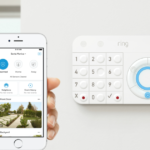
Ring Alarm Review 2026: Sensors, Monitoring, Cameras, Privacy, Outages, and a 60-Minute Test
Review Ring Alarm by current equipment and plan records, property coverage, sensors, cameras, household access, privacy, outages, cost, and testing.
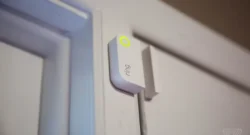
Ring Subscription Changes 2026: What Homeowners Pay For Now
Ring now requires a paid plan for video history, person detection, and rich notifications. Ring Protect Basic costs $5/mo per device, Pro is $20/mo for all devices. Here is exactly what you lose witho...