

Alder is a quote-led home-security option, so a useful 2026 review cannot rely on an old national price table. The decision turns on the exact equipment, legal seller, monitoring service, contract, cancellation instructions, and recovery behavior written into your offer.
Alder’s current home page describes plug-and-play installation and monitored emergency response. Its home-security page describes 24/7 monitoring, mobile-app control, and Android and iOS support. Those public descriptions are a starting point—not a substitute for the signed agreement or a test at your address.
Alder review: the short answer
Alder may fit a household that wants a guided sale, a configured system, and professional monitoring. It is a weaker fit when the buyer wants public checkout pricing, a short commitment, easy hardware portability, or a self-monitoring-first path. Do not accept a verbal monthly number as the complete offer. Ask for the entire agreement and equipment schedule before authorizing installation or payment.
| Decision | Evidence to collect | Reject or pause when |
|---|---|---|
| Seller identity | Legal company, salesperson name, license where required, office address, support number | The rep will not leave verifiable details |
| Equipment | Manufacturer, model, quantity, ownership, warranty, replacement terms | The quote uses only generic labels such as “panel” or “camera” |
| Monitoring | Monitoring entity, signal paths, test procedure, escalation list, dispatch rules | “24/7” is offered without a written response path |
| Contract | Initial term, renewal, total recurring payments, price-change clause, cancellation method | Only the monthly payment is shown |
| Exit | Notice address, deadline, equipment balance, local behavior after service ends | The seller says cancellation is “easy” but will not show the clause |
What is public and what remains quote-specific
The current Alder pages support several limited observations: the company markets security equipment, an app, and monitored response. They do not establish the exact price, term, device list, cellular carrier, camera storage, warranty, or cancellation cost for every household. Promotions and dealer offers can also change.
Build the decision from three documents:
- Property map: every door, window, motion area, life-safety device, camera view, keypad, and responder.
- Written quote: each item, one-time charge, recurring charge, discount, tax, shipping, activation, installation, and optional service.
- Agreement: the legal entity, initial term, renewal, cancellation, move, warranty, service, data, and dispute provisions.
The broader home-security buying guide can help create an equal property map before comparing Alder with another provider.
Verify the person and company before a doorstep sale
Do not use a badge, branded shirt, or tablet screen as identity proof. Ask the representative to provide a leave-behind document with the legal seller, their full name, a callback number published by the company, and any license required in your jurisdiction. Call a number you found independently.
The FTC’s current home-security shopping advice warns buyers to check a salesperson’s identity and claims. It also explains that the Cooling-Off Rule can give buyers three business days to cancel certain transactions signed at home or away from the seller’s permanent place of business. Coverage has conditions, so read the FTC guidance and your cancellation notice rather than assuming every sale qualifies.
Demand an exact Alder equipment schedule
A room count is not an equipment plan. Put the manufacturer and model beside every line item. Record whether the device is bought, financed, leased, loaned, or replaced only while service remains active.
- Control equipment: panel, hub, keypad, siren, power supply, backup battery, communicator, and radios.
- Intrusion: door/window contacts, motion sensors, glass-break sensors, and panic controls.
- Life safety: exact smoke, heat, carbon-monoxide, flood, and freeze devices plus listed replacement dates.
- Video: camera model, power, network, resolution, recording trigger, storage, retention, download, and subscription requirement.
- Automation: locks, lights, thermostats, voice platforms, and any bridge or cloud account each feature needs.
Do not infer compatibility from a logo or a similar model. Ask the seller to demonstrate the exact app, panel, camera, and automation behavior included in the quote.
Monitoring needs a tested signal path
“Professionally monitored” does not describe how a signal travels or what happens after it arrives. Record the primary and backup communication path, whether internet loss affects cameras or app access, how a low-battery or communication failure appears, and which monitoring entity receives the event.
Before normal dispatch is enabled, use the provider’s approved test mode to prove:
- each zone has the correct plain-language name;
- entry and exit delays match the household’s routine;
- panic and life-safety devices follow their documented paths;
- the call list and verification words are current;
- local siren, app alert, monitoring record, and recovery are all separate checks.
Read the contract as a total obligation
Copy these fields into one page before signing:
| Contract field | Question | Written answer |
|---|---|---|
| Initial term | What exact date does it begin and end? | Record dates, not “three years” or “five years” alone |
| Renewal | Does it renew monthly or for another fixed term? | Record notice deadline and delivery method |
| Recurring price | Can the provider change it, and when? | Record base price, taxes, add-ons, and escalation clause |
| Equipment | Who owns it and when? | Record cash price, financed balance, lease, or return duty |
| Cancellation | What is owed before and after the initial term? | Record formula, fees, notice address, and proof required |
| Move or death | What happens to the agreement and devices? | Record transfer, relocation, estate, and disability terms |
Use the monitoring cancellation checklist to preserve the contract, notices, tracking receipts, confirmation numbers, final bill, and local-system handoff.
Calculate three-year cost from your quote
A promotional equipment number can hide recurring cost, and a low monthly number can omit cameras or backup. Use a written worksheet:
Three-year cost = equipment and installation + activation and shipping + 36 recurring payments + taxes and mandatory add-ons + expected replacements − guaranteed credits.
Run a second total through the actual contract end date. Keep financed equipment separate from monitoring so you know which obligation remains if service stops. Do not count a verbal discount, referral credit, or insurance saving unless the responsible party confirms it in writing.
App, cameras, and account ownership
A security system can be physically installed yet difficult to hand over. Before commissioning, identify the primary account owner, administrator, billing owner, recovery email, recovery phone, monitoring password, camera owner, and every shared user.
For video, test live view, motion recording, event history, clip export, deletion, microphone controls, and access removal. Alder’s published privacy statement describes processing monitoring information and, when recording features are enabled, video and audio data. Read the current notice and configure only the access and recording the household needs.
Outage and recovery tests
Run controlled failures before relying on the system:
- disconnect home internet while power remains on;
- remove AC power and observe the backup path;
- restart the router and panel separately;
- place one phone on mobile data and another offline;
- create a communication failure in approved test mode;
- restore service and verify every zone returns without a hidden trouble state.
Record what still detects locally, what still sounds, what reaches monitoring, what reaches the app, and what stops. A camera stream, burglar alarm, and life-safety event may have different dependencies.
Alder vs flexible DIY paths
If the Alder quote is complete and the monitored workflow tests well, compare it with an equal sensor map—not a starter-kit headline. The current Alder vs Abode comparison separates a quote-and-contract path from a more flexible DIY path. The no-contract guide is useful when service flexibility matters more than a guided sale.
For any alternative, repeat the same equipment, monitoring, ownership, outage, privacy, and three-year-cost checks. No-contract does not automatically mean no subscription, and DIY does not automatically mean self-monitoring.
60-minute Alder acceptance test
- Match the legal seller, agreement, equipment schedule, installation record, and billing descriptor.
- Photograph each exact model, serial number, mount, power source, and included accessory.
- Open every protected door and window slowly and normally; verify zone name, panel state, chime, alarm mode, and reset.
- Walk-test motions from likely entry paths while checking pet and household routines.
- Use approved test mode to prove intrusion and life-safety reporting without causing an avoidable dispatch.
- Test entry and exit delay with every adult who must use the system.
- Disconnect internet, then AC power, and record local, cellular, app, video, and monitoring behavior separately.
- Test live video, triggered recording, clip export, retention, audio, and user removal for each camera.
- Remove one invited user and prove access disappears from both the security and camera paths.
- Reconcile the first bill with the quote, contract, discounts, taxes, equipment balance, and recurring services.
Verdict
Alder should be judged from the exact agreement and installed result, not from an old price table or a sales promise. A good offer names every device, defines monitoring and response, makes the total obligation clear, documents account ownership, and passes the acceptance test. Pause when the seller will not supply those basics before commitment.
Frequently asked questions
Does Alder publish one price for every home?
The current public pages present the service and equipment path, but the complete price, device list, term, and promotion can be quote-specific. Require a written itemized offer and agreement.
Can I cancel an Alder sale signed at home?
The FTC Cooling-Off Rule covers certain sales made at home or away from a seller’s permanent place of business and generally provides three business days. Coverage has conditions. Read the FTC guidance, the dated cancellation notice, and applicable state law immediately.
Will Alder equipment work after monitoring ends?
Do not assume. Ask for written local behavior, app access, camera access, automation, communicator, ownership, and account-release details for every exact model.
What is the most important pre-signing test?
Get the full agreement and equipment schedule before installation. If the legal seller, term, total payments, cancellation method, and device ownership are unclear, the offer is not ready to sign.
Latest News

Alder vs Abode 2026: Contract Sales Model vs Flexible DIY Security
Alder sends door-to-door salespeople and locks you into 36-60 month contracts with early termination fees up to $1,500. Monthly plans run $35-50/mo — no free tier, no self-monitoring option. Abode sel...
SimpliSafe vs Alder Security 2026: DIY Equipment, Monitoring, Contracts, Cameras, and 3-Year Cost
SimpliSafe vs Alder Security compared on pricing, contracts, equipment, monitoring, and 3-year total cost. SimpliSafe: $200 upfront, $0-28/mo, no contract. Alder: $0 upfront but 3-5 year lock-in at $3...
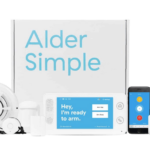
Alder Security Review 2026 Update: Equipment, Monitoring, Cameras, and Cost
Alder locks you into 36-month contracts at $35-45/mo with ETFs up to $1,500. Equipment is "free" — you pay for it over 3 years. Total cost: $1,260-1,620. Customer acquisition is door-to-door sales wit...