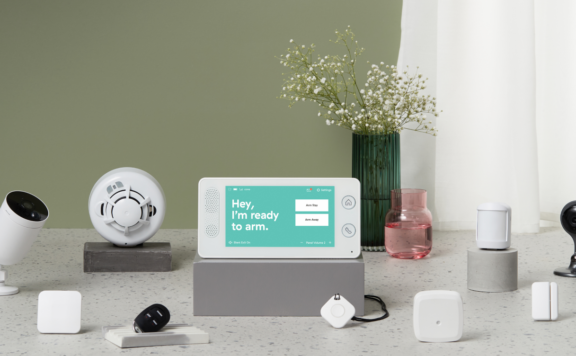
The best no-monthly-fee security system for a renter starts with removable entry sensors, a local siren, useful app alerts, and an upgrade path. A free plan can reduce recurring cost, but it also makes the household responsible for seeing, checking, and acting on alerts. Compare the exact free features, storage, internet behavior, account recovery, lease limits, and move-out process before buying.
Renter no-fee security checklist
| Decision | Pass condition | Warning sign |
|---|---|---|
| Lease fit | Written approval covers mounts, exterior devices, locks, and shared areas | Installation depends on drilling or changing common property |
| Entry coverage | Priority doors and accessible windows have named, tested sensors | The kit is camera-only |
| Free operation | Current free features are listed by function and tested | “No fee” hides paid alerts, history, storage, or automation |
| Response | Two people know how to verify and act on an urgent event | A single phone owner is the whole response plan |
| Move-out | Devices, adhesives, accounts, codes, clips, and reset steps are documented | The tenant cannot remove or transfer the system cleanly |
Start with the lease and property rules
Check drilling, adhesives, door hardware, exterior cameras, hallway recording, Wi-Fi devices, smart locks, insurance, and restoration requirements. Ask the owner or manager in writing when the lease is unclear. Building permission does not replace privacy or recording law, and a manufacturer’s removable mount does not guarantee paint or veneer will remain undamaged.
Build a sensor-first plan
List the front door, balcony or patio door, accessible windows, garage access, storage cage, and any internal door that protects a shared/private boundary. Start with contact sensors on the highest-risk openings. Add motion only where normal movement, pets, heating, sunlight, and roommates will not create constant false alarms. A camera can confirm context, but it should not be the only way the system knows an entry opened.
What “no monthly fee” must include
- Arming and disarming from local controls and the current app.
- Push alerts for named priority sensors.
- Local siren behavior and event history.
- Member invitations, roles, and account recovery.
- Camera live view, clips, local storage, or snapshots if cameras are included.
- Automations, integrations, and exports that remain available without a plan.
Verify each function on the vendor’s current plan page. Free features can differ by product, region, app version, and account age. Do not rely on an old review or marketplace listing.
Self-monitoring is a response job
Assign a primary and backup responder. For each urgent sensor, write the safe verification step, landlord or property contact, and the conditions for calling emergency services. Test the alert with the primary phone locked, silenced, offline, or unavailable. Nobody should enter a potentially unsafe unit or confront a suspected intruder to verify an alert.
Best setup by renter type
| Home | Start with | Add only if justified |
|---|---|---|
| Studio | Main-door sensor, local siren, backup recipient | One indoor camera aimed at the entry |
| Ground-floor unit | Main door, patio door, accessible-window sensors | Privacy-limited camera or glass-break coverage |
| Shared home | External-entry sensors, named users, written privacy rules | Cameras only in agreed common/security areas |
| Frequent traveler | Entry sensors, two responders, offline warnings | Paid short-term or ongoing monitoring when alerts may be missed |
| College apartment | Simple entry coverage, local controls, clear roommate handover | Portable camera or leak sensor tied to a real risk |
Cameras without subscription surprises
Check what happens after a free trial ends. Test live view, first-frame capture, night exposure, motion zones, person alerts, clip length, retention, overwrite, local storage, export, offline warnings, and power recovery. Aim indoor cameras at your own entry rather than through windows or into shared halls. Avoid bedrooms, bathrooms, neighboring windows, and areas where roommates reasonably expect privacy.
Smart locks need landlord and key planning
Do not replace building or unit hardware without written approval. Preserve the mechanical key path and original hardware. Test latch alignment, keypad, app, named codes, removed codes, battery warning, network loss, inside release, and emergency access. Record who owns the lock account and who can recover it. Restore the approved hardware and remove tenant access at move-out.
Internet and power failure tests
| Failure | Safe test | Record |
|---|---|---|
| Internet down | Disconnect WAN while local power stays on | Local siren, app, cameras, alerts, history, recovery |
| AC power loss | Use a planned short outage | Hub, router, cameras, lock, siren, measured runtime |
| Primary phone unavailable | Lock it away during an approved test | Second recipient, local control, response ownership |
| Sensor removed | Remove one device according to instructions | Tamper/offline warning, adhesive condition, re-enrollment |
| Account recovery | Use the documented recovery path | Email, MFA, trusted device, support, restoration |
Three-year and move-out cost
Add the hub, sensors, cameras, locks, mounts, batteries, local storage, optional plans, replacement adhesives, damaged-paint repair, device replacement, and move-out labor. Include the value of household response time. A zero-dollar subscription does not mean zero operating cost. Compare the free path with short-term monitoring during travel and with a continuous paid plan.
Accounts, roommates, and handover
Use named users rather than one shared password. Give each person the minimum permissions required. Record the owner email, MFA method, trusted devices, recovery path, codes, notification owners, and plan status. Remove former roommates, phones, installers, integrations, and voice assistants promptly, then confirm their access fails.
Move-out checklist
- Export any records the household is entitled to keep.
- Remove former residents, codes, integrations, and trusted devices.
- Photograph devices and surfaces before removal.
- Remove mounts and adhesives using the maker’s instructions.
- Restore approved locks and original hardware.
- Factory-reset or transfer each device only after ownership is clear.
- Repair lease-required surface damage and document handover.
- Test the system again at the new home before relying on it.
Where Abode fits
Abode can fit renters who want a sensor-led DIY alarm with self-monitoring and optional paid services. Verify current free app functions, plan features, cellular backup, camera storage, integrations, and location support. Compare the Smart Security Kit, Mini Door/Window Sensor, Abode Cam 2, and current Abode plans.
Related renter guides
Use the college-apartment guide, security without Wi-Fi guide, and no-subscription camera guide to test the parts that matter for your property.
Verdict
For most renters, the strongest no-fee setup is a small sensor-led system with a local siren, clear app alerts, two responders, lease-safe mounting, and a documented move-out process. Add cameras, locks, or paid service only when they solve a defined problem and pass the same outage and handover tests.
FAQ
Can renters use security systems without a monthly fee?
Yes. Verify the exact free functions, then plan who will see, check, and act on alerts because self-monitoring leaves response with the household.
Do renters need landlord permission?
Permission depends on the lease and the work. Get written approval for drilling, exterior devices, lock changes, or changes to shared property.
Are no-fee cameras really free?
Some retain useful live view or local storage without a plan, while other recording, detection, or history features may require payment. Check the current plan for the exact model.
What happens when a renter moves?
Remove access, document surfaces and devices, restore approved hardware, transfer or reset accounts carefully, and recommission the system at the new home.
Prove the no-fee setup before the return window closes
A plan page can describe what should be available without a subscription, but a renter needs evidence from the installed system. Build one acceptance sheet for sensors, siren, app alerts, cameras, local storage, household response, internet loss, power loss, recovery, and move-out. Test with every trial and paid-only feature identified, then approve only the functions that remain on the intended no-fee path.
| Job | No-fee proof | Return-window failure |
|---|---|---|
| Entry detection | Named door and window sensors create local events and the intended alerts | A priority opening is uncovered or the event depends on a camera guess |
| Local alarm | The siren and local controls work with the internet disconnected | The household cannot identify or silence the alarm safely |
| Phone alerts | Primary and backup phones receive named priority events under normal settings | Alerts arrive late, without a zone name, or only on one owner phone |
| Camera evidence | The approved recording path captures, retains, plays, and exports a useful clip | Recording, useful history, or export disappears after the trial |
| Response | Two people can verify and escalate without unsafe entry | Nobody owns an urgent alert when the primary phone is unavailable |
| Move-out | Mounts, accounts, codes, clips, and original hardware have a tested exit plan | Removal damages the property or leaves a former resident connected |
Write a trial-versus-free feature ledger
Record every feature visible on day one: sensor alerts, arming controls, event history, camera live view, recorded clips, person or package detection, downloads, multiple users, automations, integrations, cellular backup, monitoring, warranty, and support. For each row, mark included without payment, trial-only, paid, unknown, or not supported. Link the vendor record and add the date checked.
Use the subscription renewal audit even when the plan is to pay nothing. It forces the household to record billing owner, trial end, renewal behavior, cancellation path, and the functions expected after cancellation. A no-fee claim is not accepted until the post-trial state matches the worksheet.
Test the exact sensor and siren jobs
Name each sensor by place and purpose, then open the door or window at normal and slow speeds. Record the local event, siren rule, app alert, recipient, timestamp, and recovery. Test the unit’s real weak points: balcony door, accessible window, storage door, garage entry, or a bedroom boundary in a shared home. Do not approve a camera-only substitute when the job is to prove an opening.
Stand in every occupied room during an approved siren test. A siren that is loud beside the hub may be missed behind a closed bedroom door, by a sleeping resident, or by someone using headphones. Define an accessible alert path where needed and keep the test short enough to avoid disturbing neighbors.
Measure alert delivery and household response
Time alerts on the primary and backup phones with the screens locked. Repeat with Focus or Do Not Disturb settings, weak Wi-Fi, cellular data, and the primary phone unavailable. The response sheet should name who checks a sensor event, who can see the relevant camera, who contacts the property manager, and when emergency services may be called.
Build that handoff with the no-subscription local-responder checklist. Nobody should enter a unit, approach a suspected intruder, or rely on a remote video clip when doing so would create danger. “Self-monitored” means the household owns the decision path; it does not mean one person must handle every alert.
Remove the camera trial from the decision
Test each camera at its final renter-safe position in daylight and darkness. Walk the entry path, create an ordinary delivery event, and generate nuisance motion from headlights, shadows, pets, insects, or indoor traffic. Record first useful frame, subject visibility, alert delay, clip start, clip end, audio choice, retention, and export.
If the no-fee design uses a memory card, run the microSD card health audit. Confirm supported card type, recording mode, capacity, overwrite, full-card behavior, failure warning, playback, export, camera theft risk, and replacement interval. A card icon in an app does not prove that useful evidence is being written.
Disconnect the internet without cutting local power
Keep the hub, sensors, camera, router, and phones in known states. Disconnect broadband, then trigger one priority sensor and one camera event. Record local siren, local controls, recording, queued events, remote app access, alerts, timestamps, and recovery. Restore broadband and verify that the system does not remain stale, disarmed, or on the wrong clock.
Repeat power loss separately. Measure the runtime of the hub, router, access point, camera, and any storage device that the no-fee path needs. A battery-powered hub cannot deliver remote alerts through an unpowered router. Record the first failed dependency rather than assigning one backup-time claim to the whole system.
Install and remove one mount before committing
Paint, veneer, glass, tile, metal, temperature, humidity, adhesive age, and device weight change removal risk. Use the sensor adhesive mounting guide to test one representative surface in an approved location. Follow cure and removal instructions, photograph the surface, and keep replacement strips and original hardware.
Do not use an adhesive claim to bypass the lease. Exterior walls, common corridors, fire doors, door frames, windows, and smart-lock changes may need written approval even when no drilling is planned.
Approve the move-out path at move-in
Assign ownership for the hub, sensors, cameras, memory cards, clips, phone accounts, codes, integrations, mounts, and original property hardware. Use the HomeKit renter move-out checklist when Apple Home is part of the setup. The same discipline applies to other connected-home platforms: remove people, sessions, hubs, shares, automations, and recovery paths without deleting evidence or devices that belong to someone else.
Test one sensor removal and re-enrollment while the return window is open. Confirm the adhesive releases as expected, the device can be reset or transferred, and the system reports removal or tampering. Keep the account owner and recovery method independent of a roommate who may leave first.
Run a 90-minute renter no-fee acceptance test
- List the lease rules, approved mounts, priority openings, local alarm, cameras, responders, account owner, trial end, return deadline, and move-out owner.
- Mark every visible feature as no-fee, trial-only, paid, unknown, or unsupported using a dated vendor source.
- Trigger each priority sensor and confirm the local event, zone name, siren rule, primary alert, backup alert, and timestamp.
- Test the siren and local controls from occupied rooms under an approved, short test.
- Create daylight, low-light, and nuisance camera events; export a clip and open it on another device.
- Verify local-card health, overwrite, full-storage behavior, and failure warning where local storage is used.
- Disconnect broadband without cutting power; record local alarm, recording, remote access, alerts, queued events, and recovery.
- Test the primary phone unavailable and run the written local-responder escalation.
- Remove and reinstall one approved adhesive-mounted sensor; inspect the surface and confirm re-enrollment.
- Disable or exclude trial and paid-only functions, then repeat the priority sensor, camera, alert, and export checks.
- Review three-year cost, batteries, storage, replacement mounts, network work, optional travel monitoring, and owner time.
- Approve, fix, or return the system before the recorded deadline.
The broader no-subscription return-window test adds evidence, outage, and rollback detail for any property type. Use this renter layer to add lease, privacy, adhesive, roommate, and move-out decisions.
Pass: priority openings create local and named phone events, the local siren and controls survive the tested internet loss, the household can respond with one phone unavailable, camera evidence works on the approved no-fee path, mounting meets the lease, and move-out is documented. Fail: a required event depends on trial-only service, storage fails silently, one phone is the only responder, an important opening is camera-only, the mount risks unapproved damage, or account transfer is unclear.
No-fee launch blockers for renters
- The post-trial feature set is unknown or cannot be tested before the return deadline.
- A priority door or accessible window lacks direct sensing.
- The local siren, arming control, or named event fails when broadband is disconnected.
- Camera recording, retention, or export depends on a service the renter does not intend to keep.
- Only one phone receives urgent events or knows the response process.
- The installation lacks written approval where the lease or building rules require it.
- Adhesive, drilling, exterior placement, or lock changes create an unpriced restoration risk.
- A roommate owns the only administrator, recovery, storage, or connected-home account.
- Move-out cannot remove people, codes, clips, devices, and mounts without loss or damage.