Shared driveways make home security trickier. You may need to watch vehicles, packages, gates, side doors, or garage entries without recording a neighbor’s private space or creating a dispute over camera placement.
Quick answer
The best shared-driveway security setup in 2026 is a privacy-aware DIY system with entry sensors on the home and garage, carefully angled outdoor cameras, privacy zones, motion alerts tuned to people and vehicles, and flexible monitoring that does not lock the household into a long contract.
Shared-driveway security checklist
- Garage-to-home door: protect the interior entry from the garage before spending more on driveway cameras.
- Camera angle: aim cameras at your vehicle, garage, gate, or packages instead of a neighbor’s windows, porch, or yard.
- Privacy zones: use privacy masking and activity zones to cut unnecessary recording.
- Lighting: add motion lighting where allowed so cameras do not rely only on night vision.
- Alerts: tune motion zones to reduce false alerts from neighbor traffic, pets, delivery drivers, and street activity.
Camera placement rules
Shared driveways reward restraint. A wide field of view may capture more, but it can also create privacy risk. The better setup narrows the field to the vehicle, garage, gate, or entry path that you actually need to protect.
Alarm and monitoring fit
Cameras help verify activity, but entry sensors and alarms still do the security work. Compare self-monitoring, professional monitoring, cellular backup, and siren behavior before relying on cameras alone.
36-month cost test
Price outdoor cameras, video storage, smart alerts, motion lighting, entry sensors, garage sensors, monitoring, cellular backup, batteries, mounts, and replacement hardware. Camera subscriptions can cost more than the hardware over time.
June 2026 internal links for shared-driveway setups
June 2026 internal-linking update: if the driveway is shared and the household wants to avoid another monthly bill, start with the no-subscription shared-driveway security guide. It focuses on camera placement, neighbor rules, storage, and useful alerts without over-recording shared space.
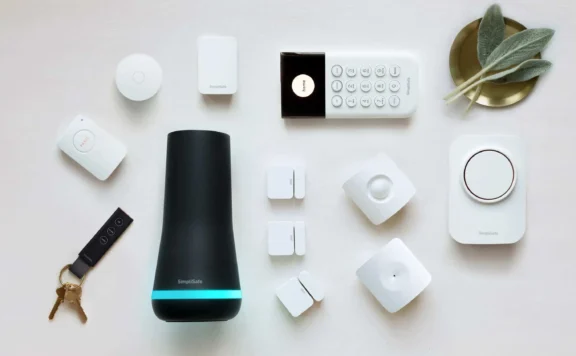
For homes with roommates or multi-unit access, add the shared-house security routine, the shared-house smart-lock guide, and the no-subscription shared-house systems guide. A simple Abode path pairs the Smart Security Kit with Abode Cam 2 for driveway awareness and entry protection.
Related guides
- Security camera privacy guide
- Best townhouse security systems
- Best security systems for duplexes
- Best no-subscription security cameras
Bottom line
For shared driveways, the best system protects the vehicle and garage without over-recording the neighbor. Start with sensors and smart camera placement, then add monitoring if you want emergency response beyond app alerts.
Shared Driveway Security Setup Checklist
Shared driveways create a security problem most camera guides ignore: the same motion zone may include your car, your neighbor, delivery drivers, and visitors who are not security threats. The best setup keeps your alerts useful while avoiding privacy friction.
| Setup area | Common issue | Recommended approach |
|---|---|---|
| Camera angle | Wide views can capture a neighbor driveway or windows. | Aim cameras at your vehicle, garage, or entry path, and use privacy masks where available. |
| Motion alerts | Every shared driveway movement can become a notification. | Use person or vehicle detection and draw zones only around your side. |
| Lighting | Floodlights can annoy neighbors if they trigger too often. | Use lower-brightness path lighting or targeted motion lights aimed at your property. |
| Entry sensors | Driveway cameras do not prove that someone entered the home. | Pair cameras with contact sensors on garage, side, and main entry doors. |
| Neighbor coordination | Security devices can create trust issues in shared spaces. | Explain the camera field of view and keep recordings focused on your property. |
For shared driveways, sensors should do the security work and cameras should verify events. That keeps the system useful without turning routine neighbor traffic into a stream of false alarms.
Related shared-driveway security guides
If this shared-driveway guide is your starting point, use it with the newer focused guides below. Start with the Abode Smart Security Kit, add Mini Door/Window Sensors to private entries, consider Abode Lock for code-based access, and use Abode Cam 2 only where the view stays on your property. Compare Abode plans when self-monitoring is not enough.
- Best no-subscription systems for shared driveways
- Best smart locks for shared driveways
- Best HomeKit systems for shared driveways
- Best smart-home routines for shared driveways
- Security camera privacy guide
August 2026 update: turn a shared driveway into separate security zones
A shared driveway should not be treated as one alarm zone. Separate it into four jobs: shared movement, private vehicle space, private building openings, and household response. Cameras can add context around the first two jobs. Door, window, garage, and gate sensors should report the private openings directly. The response plan decides who checks an alert and when monitoring or emergency services should be involved.
Shared-driveway decision table
| Question | Preferred evidence | Common mistake | Acceptance check |
|---|---|---|---|
| Did a vehicle enter the shared lane? | Camera event with a useful approach frame | Turning every vehicle event into an alarm | Walk and drive the route in daylight and darkness |
| Did someone enter the garage or home? | Direct contact sensor on the opening | Inferring entry from driveway motion | Open each protected door and verify the exact label |
| Is the event on your property? | Defined activity zone and privacy mask | Recording a neighbor’s windows, yard, or routine traffic | Review the live view with the neighbor-side boundary visible |
| Was a package left at your entrance? | Doorbell or entry camera with approach and handoff frames | Expecting a wide driveway camera to prove delivery details | Run a real package-placement test |
| Who responds after an alert? | Written contact order and escalation rule | Giving every household member every alert | Run the route with one responder unavailable |
| What survives an outage? | Test record for siren, sensor, camera, storage, app, and monitoring | Assuming battery power also preserves internet service | Disconnect internet and AC power separately |
1. Draw the boundary before placing a camera
Mark the shared pavement, property line, easement, your parking area, garage opening, side gate, front entrance, package area, neighboring windows, and any public sidewalk. Then write the job for each proposed camera. “Watch the driveway” is too broad. “Show a person crossing from the shared lane to my garage door” is testable. Aim at your approach and openings, use privacy masks where the exact model supports them, and avoid audio recording unless its purpose and local rules are clear.
2. Protect private openings with direct state
Put compatible contact sensors on the garage-to-home door, exterior garage door or supported tilt point, side gate where appropriate, and any other private entry that matters. Use clear labels such as “Garage interior door” rather than “Door 3.” A camera notification can be delayed, missed, or ambiguous. A direct opening sensor answers the narrower question that should drive an alarm rule: did this protected opening change state?
For a DIY sensor-led path, compare the Abode Smart Security Kit with the exact Mini Door/Window Sensor placement and current plan options. Confirm compatibility, range, supervision, siren behavior, cellular or internet dependencies, and response scope before buying.
3. Design camera coverage around an evidence question
- Approach camera: should show travel from the shared lane toward your entrance without staring into a neighboring home.
- Garage or parking camera: should show the protected vehicle or door and the first useful frame before contact.
- Doorbell or entry camera: should show the person at the private threshold, delivery handoff, and departure route.
- Inside-garage camera: may add evidence after entry, but it needs a privacy decision, a power plan, and a disclosure rule for household members or workers.
Test the exact Abode Cam 2 or other selected camera for field of view, power, Wi-Fi, night exposure, event trigger, recording start, clip length, storage, retention, timestamps, export, and account access. Follow the security-camera privacy guide before enabling broad motion or audio.
4. Tune alerts to actions, not curiosity
| Event | Normal route | Escalate when |
|---|---|---|
| Vehicle crosses shared lane | Log or low-priority notification | It enters your private area or matches another direct event |
| Person approaches private garage or side door | Responder reviews camera and opening state | The person remains, tests an opening, or direct state changes |
| Protected door opens while armed | Local siren and selected alert or monitoring path | The event is not explained through the agreed verification route |
| Camera offline | Service ticket or maintenance reminder | Another layer is also unavailable or the outage persists |
| Package event | Household notification | Removal, tampering, or a related opening event follows |
Use the false-alarm checklist to assign labels, delays, quiet hours, pet and vehicle filters, and test-mode rules. A useful alert should tell the receiver what happened, where it happened, and what action is expected.
5. Agree on shared-space privacy before conflict starts
If another household uses the lane, show them the planned field of view and explain what is masked, recorded, retained, and shared. Do not promise that a privacy zone changes every form of processing unless the manufacturer documents that behavior for the exact model. Decide whether the camera records continuously or only on events, whether audio is enabled, who can export clips, and when footage is deleted. Keep a screenshot of the approved view after installation and after every remount or camera replacement.
6. Separate household roles and recovery
Use named accounts rather than one shared administrator login. Give the owner control of billing, integrations, exports, device removal, and recovery. Give household members only the access needed to arm, disarm, view selected cameras, or respond. Remove installers, former residents, cleaners, and temporary users when their work ends. Turn on multi-factor authentication where available and store recovery codes outside the monitored property.
7. Test power, Wi-Fi, internet, and cloud failures separately
A battery camera can remain powered while its Wi-Fi or internet route is unavailable. A sensor can still reach a local hub while app notifications fail. A recorder can keep footage locally while remote viewing stops. Write the expected result for local sensor state, siren, camera capture, local storage, cloud recording, app alerts, remote access, monitoring, and evidence export under each failure.
- Disconnect home internet while leaving local Wi-Fi and power on.
- Disconnect AC power and record hub, router, camera, and recorder runtime.
- Block one camera’s network route without disabling the direct sensors.
- Fill or remove the selected storage path under controlled conditions.
- Sign out one responder and confirm another person can recover the account.
Use the backup-power runtime test and backup-internet guide to document actual behavior instead of relying on a feature list.
8. Compare cost at the same property scope
Price the same protected doors, garage opening, users, cameras, storage days, internet or cellular backup, monitoring level, batteries, mounts, lighting, installation, taxes, permits, maintenance, and replacement cycle. Include any camera or storage plan, expected rate changes, and the labor needed to maintain privacy zones and alert rules. A low equipment price is not a fair comparison if it omits the recorder, storage, subscription, backup power, or response service needed for the chosen design.
9. 60-minute shared-driveway acceptance test
- Minutes 0–10: walk the shared lane, property boundary, private parking area, garage, side gate, front door, package area, and camera views. Confirm no private neighboring window is a recording target.
- Minutes 10–20: drive and walk the approach in both directions. Check event labels, first useful frame, privacy masks, timestamps, and false alerts from routine shared traffic.
- Minutes 20–30: open every protected garage, side, and home entry. Verify direct state, exact labels, siren or delay, app alert, and monitoring route where enabled.
- Minutes 30–40: place and retrieve a package, approach a vehicle, and test low-light coverage. Confirm the footage answers the intended evidence question.
- Minutes 40–50: disconnect internet and AC power separately. Record local alarm, camera, storage, app, monitoring, and recovery behavior.
- Minutes 50–60: remove a temporary user, export one event, recover one account route, and write an owner and retest date for every defect.
Shared-driveway verdict
The strongest design keeps shared movement low priority, protects private openings with direct sensors, aims cameras at defined evidence jobs, limits recording to your property, and gives each alert a named response. Do not buy from a feature list alone. Pass the complete route under daylight, darkness, routine neighbor traffic, internet loss, and power loss.
FAQ
Can a camera watch a shared driveway?
It may be possible, but placement, audio, retention, disclosure, and legal rules vary. Aim at your property and entrance, use supported activity and privacy zones, and avoid recording neighboring private areas.
Should driveway motion trigger the home alarm?
Usually not by itself. Treat shared-lane motion as context. Use direct door, window, garage, or gate state for the events that drive arming and alarm rules.
What should happen if the driveway camera goes offline?
The direct opening sensors and local alarm should retain their defined jobs. Document whether local recording, app alerts, remote viewing, cloud storage, and monitoring remain available.
How often should a shared-driveway setup be retested?
Retest after a camera move, router or plan change, new vehicle, access change, neighboring construction, major season change, or any missed event. Run the full route at least twice a year.