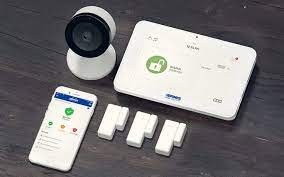
No-subscription security can work well in a townhome, but only if the system still covers the doors, the lock, and the main alert path. The mistake is buying cameras first and assuming motion alerts equal intrusion response.
Product links checked: Abode Smart Security Kit, Mini Door/Window Sensor, Abode Cam 2, and Abode plans.
Best no-subscription setup for townhomes
| Townhome area | First layer | Why it matters |
|---|---|---|
| Main entry | Door sensor plus smart lock | The lock controls access; the sensor confirms the door opened. |
| Garage or rear entry | Contact sensor | Secondary doors are easy to forget when leaving in a hurry. |
| Patio or side path | Outdoor-aware camera | Video helps with visibility, but it should support the alarm layer. |
| Shared walls | Quiet app alerts | Townhome buyers often need low-noise alerts that do not annoy neighbors. |
Where Abode fits
The Abode Smart Security Kit is a strong fit when townhome buyers want a no-contract starting point. Add the Mini Door/Window Sensor on secondary entries and use the Abode Cam 2 where visibility matters.
Compare Abode plans before deciding that no subscription is the permanent answer. Some townhomes are fine with self-monitoring. Others need cellular backup or professional monitoring because the owner travels or cannot respond quickly.
Townhome no-subscription checklist
- Cover every entry door before adding extra cameras.
- Pair smart-lock access with a door sensor.
- Keep camera alerts focused on entry paths, not every sidewalk motion.
- Check whether siren and app alerts work without a paid plan.
- Keep a clear upgrade path if monitoring becomes worth the monthly cost.
Related guides
Next reads: smart home security systems for townhomes, smart locks for townhouse doors, and no-monthly-fee home security systems.
Run a no-subscription townhome system, not just a device list
A no-subscription setup saves money only when someone owns the alert, evidence, access, maintenance, and recovery jobs. Use the links below as an operating plan. Test each route before the return window closes, after a router or phone change, and whenever a resident, cleaner, dog walker, or contractor loses access.
| Townhome event | What to prove | Supporting guide |
|---|---|---|
| Internet or app path fails | The local siren, keypad, locks, and safe entry still work; the outage is visible; no stale automation runs after reconnection. | Security without internet |
| Primary phone is replaced or lost | A second named user can act, the old phone can be revoked, and alerts, camera access, codes, recovery, and MFA move safely. | Phone replacement checklist |
| Lock battery or auto-unlock fails | The door stays secure, a local key or keypad path works, and a geofence cannot unlock or disarm from a stale location event. | Lock battery and outage checklist and auto-unlock safety checklist |
| Camera sees a real event | The useful clip can be found, exported, timestamped, shared, and preserved without exposing a neighbor’s private area. | Evidence preservation guide and camera privacy guide |
| Repeated nuisance alert | The household can identify the source, correct placement or rules, and keep the real entry path active. | False-alarm reduction checklist |
Five-minute no-subscription acceptance test
- Arm the accepted mode, open one approved entry, and confirm the local warning and every intended phone alert.
- Put the main phone on mobile data, then disconnect the home’s internet. Record what works locally, what stops remotely, and who notices.
- Trigger one camera event at the front or garage path. Export the clip and confirm the timestamp, subject detail, storage location, and retention rule.
- Use a test resident or contractor account, then remove it. Prove the old app session, lock code, camera share, voice path, and recovery route no longer work.
- Check the physical key or keypad, lock battery, sensor battery, router, hub, siren, and backup-power plan. Assign an owner and next test date.
If the household cannot respond consistently, compare the current Abode plan options instead of treating “no monthly fee” as a fixed rule. The right answer can change with travel, work hours, health, renters, or a new garage and rear-entry risk.
Build a no-subscription townhome proof plan
A no-subscription system is not simply a cart with no monthly line item. It is a household operating plan that still detects the mapped events, warns people locally, produces evidence, survives common failures, and gives a named person responsibility for response and maintenance. Townhomes add attached walls, close neighbors, multiple levels, garages, shared approaches, association rules, and exterior-camera limits. Test the full property before the return deadline.
Map the townhome as six separate jobs
| Job | Townhome proof | No-subscription pass condition |
|---|---|---|
| Front approach | Lawful doorbell or camera view, entry sensor, local warning, useful day/night evidence | The household can distinguish a person, delivery, animal, and unknown event without a paid feature assumption |
| Garage and internal door | Vehicle door, service door, and door into the home tested separately | Open/close state, local warning, access fallback, and outage behavior are known |
| Rear door or patio | Entry, gate, lighting, privacy boundary, and camera distance mapped | The route is not left uncovered because the front door received most of the budget |
| Windows and shared walls | Reachable openings identified without treating normal neighbor noise as intrusion | Sensor choice and placement pass nuisance and missed-event tests |
| Water, smoke, and carbon monoxide | Required alarms remain separate from optional leak and environmental alerts | Local life-safety warning does not depend on a camera, phone, or internet service |
| Household response | Every alert has a named recipient, safe action, backup person, and escalation rule | An event does not sit in one unavailable phone with nobody assigned to act |
Use the return window as a test period
Run the no-subscription return-window test with the intended permanent free state enabled. End any trial features before the final test where the vendor allows it, or document the exact date and retest plan. Record local arming, entry delay, local siren, phone notifications, camera live view, recording, playback, export, users, locks, automation, internet loss, power loss, and account recovery as separate rows.
Test from each floor, the garage, rear entry, front path, and the weakest normal Wi-Fi location. Include every resident’s phone and access method. A successful owner-phone test does not prove that a second resident can arm, view, export, recover, or remove access.
Prove evidence without a cloud-plan assumption
Use the no-subscription evidence checklist for every selected camera. Record the exact local or included storage path, required hub or card, supported capacity, overwrite behavior, event trigger, pre-event or first-useful-frame result, timestamp, playback, export, file ownership, and internet-outage state. Check the current documentation for the exact hardware and region.
Run one safe test by day and one in the lowest normal light. Walk the real path at the actual mounting distance, then locate and export the clip from another authorized device. If the camera provides only live view, a thumbnail, or a notification in the permanent free state, write that limitation into the decision instead of calling it recording.
Write a recovery plan that does not depend on support rescuing the account
Complete the no-subscription system recovery checklist. Save model numbers, serials, ownership records, recovery contacts, multi-factor methods, hub and storage details, router settings, device names, zones, codes, user roles, automation rules, reset order, and the safe state during rebuilding.
Run a tabletop drill for a lost owner phone, failed hub, replaced router, corrupted storage card, and a vendor account that cannot be reached. The household should know what still warns locally, how to enter safely, how to preserve existing evidence, how to revoke the old device, and how to restore coverage without exposing a door or disabling a required alarm.
Price the real free state
Use the no-subscription cost guide to calculate a 36-month total. Include the complete device quantities, hub or base, keypads, sirens, cameras, mounts, local storage, cards or drives, batteries, chargers, backup power, router or mesh work, lock hardware, replacement devices, tax, shipping, and installation. Separate required hardware from optional convenience items.
Keep a second column for optional paid services. A household can choose a free operating state today and keep an upgrade route for travel, work changes, health needs, or slow response. Do not mix the free-state feature set with the paid-state feature set when scoring the system.
Plan account deletion and ownership transfer before purchase
Use the account deletion and data-export checklist to record how clips, event history, receipts, device ownership, household users, billing, and personal data leave the account. Test removal of a secondary user and an old phone. Save the factory-reset and transfer steps for a move, sale, breakup, renter change, or device disposal.
Local storage does not eliminate account risk. Cameras, hubs, apps, shared users, device registrations, and remote notifications can still expose household data or prevent a new owner from enrolling hardware. Ownership must be recoverable and transferable without leaving a former resident with access.
Assign maintenance instead of assuming “free” means “hands-off”
Follow the home-security maintenance calendar. Name the person responsible for sensor tests, batteries, camera cleaning, local-storage health, clip export, lock fallback, router changes, firmware, user reviews, emergency contacts, and replacement dates. Put the work on a recurring calendar.
Townhomes need seasonal checks after landscaping growth, snow, glare changes, holiday decorations, garage use, new neighbors, association work, or shared-area changes. Retest the affected view and privacy boundary rather than assuming last season’s result still applies.
Run a 75-minute no-subscription townhome acceptance test
- Minutes 0–10: record the six-job property map, exact models, device quantities, users, storage, network, permanent free state, and optional paid state.
- Minutes 10–20: test front, rear, garage, internal-garage, and reachable-window sensors. Confirm local warning, names, open-entry behavior, bypass, and restoration.
- Minutes 20–32: run day and low-light camera tests at real distances. Check detection, notification, useful frame, recording, playback, export, timestamp, and privacy.
- Minutes 32–42: test locks, keypad or key fallback, low battery, a late arrival, and any automation without allowing a stale geofence to unlock or disarm.
- Minutes 42–52: interrupt internet in a controlled window. Record local alarm, storage, cameras, locks, phones, automation, outage visibility, and recovery separately.
- Minutes 52–61: test a second user, lost-owner-phone response, multi-factor recovery, device revocation, and account ownership records.
- Minutes 61–69: run tabletop responses for intrusion, water, smoke/CO, a failed lock, and an unavailable primary resident. Keep life-safety tests within approved device procedures.
- Minutes 69–75: restore all devices, confirm the intended free state, export the test record, assign every failure, and decide return, replace, or keep.
Do not approve the system until these blockers are cleared
- A front, rear, garage, internal-garage, or reachable-window job is unmapped.
- The permanent free state has not been tested separately from a trial or paid plan.
- Local warning, required life-safety alarms, or safe entry depends on internet or one phone.
- Night evidence is unusable, cannot be exported, has an unreliable timestamp, or records a private neighboring area.
- A router, hub, storage, power, battery, or account failure has no known local state and recovery owner.
- An old resident, guest, installer, device, code, or shared account retains access.
- The 36-month cost omits storage, batteries, network work, replacements, or the hardware needed to keep the free state useful.
- No one owns alerts, evidence, batteries, storage health, tests, updates, and incident response.
Retest after changing a resident, vehicle, door, lock, camera, storage device, router, account, phone, association rule, service state, automation, or garage use. A no-subscription system stays useful because the household maintains it, not because the checkout page once showed zero monthly cost.