Last Updated: March 2026
Z-Wave is a wireless protocol designed specifically for smart home devices — sensors, locks, plugs, thermostats, and lights. It runs on a mesh network where each device acts as a signal repeater, extending range throughout your home. In security, Z-Wave matters because it lets you add third-party devices to your alarm system without being locked into one brand.
Here are the best Z-Wave security devices available right now, which hubs support them, and how to build a Z-Wave-based security setup.
Why Z-Wave for Security?
| Advantage | What It Means |
|---|---|
| Mesh networking | Every powered Z-Wave device repeats signals — more devices = better coverage. No dead spots. |
| Low power | Battery-powered sensors last 2-5 years on a single battery |
| Interoperability | Z-Wave devices from any manufacturer work with any Z-Wave hub |
| Dedicated frequency | Uses 908.42 MHz (US) — no interference from Wi-Fi, Bluetooth, or Zigbee |
| Encryption | Z-Wave Plus and S2 security offer AES-128 encryption for locks and sensors |
| Range | Up to 100m outdoors per hop, with up to 4 hops in a mesh = 400m theoretical range |
Security Hubs That Support Z-Wave
Not every security system works with Z-Wave. Here are the major ones:
| Hub/System | Z-Wave | Zigbee | Matter | HomeKit | Notes |
|---|---|---|---|---|---|
| Abode | ✅ | ✅ | ✅ | ✅ | Broadest protocol support of any alarm system |
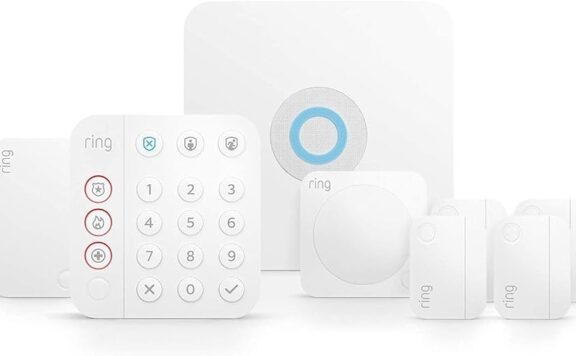
| Ring Alarm | ✅ | ❌ | Limited | ❌ | Z-Wave locks and switches only |
| SmartThings | ✅ | ✅ | ✅ | ❌ | Hub only, no alarm monitoring |
| Hubitat | ✅ | ✅ | ✅ | ❌ | Local processing, power-user focused |
| Home Assistant | ✅ (with stick) | ✅ (with stick) | ✅ | ❌ | Requires USB Z-Wave dongle |
| Alarm.com panels | ✅ | ❌ | ❌ | ❌ | Used by Frontpoint, Brinks, ADT |
Abode stands out here — it supports Z-Wave, Zigbee, Matter, AND HomeKit in a single hub. Most competitors support one or two protocols at best.
Best Z-Wave Security Devices by Category
Smart Locks
| Lock | Price | Z-Wave Gen | Key Features |
|---|---|---|---|
| Schlage Connect BE469 | ~$200 | Z-Wave Plus | Built-in alarm, ANSI Grade 1, fingerprint-resistant touchscreen |
| Yale Assure Lock 2 | ~$230 | Z-Wave Plus / Matter | Modular (swap radio modules), slim profile, DoorSense |
| Kwikset 916 | ~$200 | Z-Wave Plus | SmartKey re-key technology, touchscreen |
| Abode Lock | $99 | Z-Wave | Native Abode integration, auto-lock, PIN codes |
The Schlage Connect and Yale Assure Lock 2 are the gold standards. Both pair with Abode, Ring, SmartThings, and most Z-Wave hubs.
Door/Window Sensors
| Sensor | Price | Size | Battery Life | Notes |
|---|---|---|---|---|
| Ecolink DWZWAVE25 | ~$25 | Standard | 3-5 years | Reliable, affordable, wide compatibility |
| Aeotec Door/Window 7 | ~$30 | Compact | 2+ years | Z-Wave 700 series, faster pairing |
| Fibaro Door/Window 2 | ~$40 | Very small | 2+ years | Temperature sensor built in |
Motion Sensors
| Sensor | Price | Detection | Extra Features |
|---|---|---|---|
| Zooz ZSE18 | ~$20 | PIR, 30ft range | Magnetic mount, USB powered option |
| Aeotec MultiSensor 7 | ~$50 | PIR, temp, humidity, lux, UV, vibration | 6-in-1 sensor, USB or battery |
| Fibaro Motion Sensor | ~$50 | PIR, temp, light, vibration | Eye-catching design, configurable sensitivity |
Smart Plugs & Switches
| Device | Price | Features |
|---|---|---|
| Zooz ZEN15 Power Switch | ~$30 | Energy monitoring, 15A, heavy-duty appliances |
| Aeotec Smart Switch 7 | ~$40 | Energy monitoring, compact, Z-Wave 700 |
| Inovelli Red Series Dimmer | ~$40 | Scene control, LED notification bar, no neutral wire needed |
| Abode Smart Plug | $19 | Z-Wave, native Abode integration, CUE automation compatible |
Water & Environmental Sensors
| Sensor | Price | Detects |
|---|---|---|
| Aeotec Water Sensor 7 | ~$35 | Water leaks, with probe cable for hard-to-reach spots |
| Dome Water Leak Sensor | ~$30 | Water + temp, 150ft Z-Wave range |
| First Alert ZCOMBO-G | ~$40 | Smoke + CO, Z-Wave compatible (works with Abode) |
Z-Wave vs Zigbee vs Matter vs Wi-Fi
| Protocol | Frequency | Range | Mesh | Battery Life | Best For |
|---|---|---|---|---|---|
| Z-Wave | 908 MHz | 100m/hop | ✅ | 2-5 years | Locks, sensors, security devices |
| Zigbee | 2.4 GHz | 10-30m | ✅ | 1-3 years | Bulbs, buttons, small sensors |
| Matter | Various | Varies | Thread mesh | Varies | Cross-platform compatibility (new) |
| Wi-Fi | 2.4/5 GHz | 50m | ❌ | Poor | Cameras, high-bandwidth devices |
Z-Wave’s dedicated frequency means it never interferes with your Wi-Fi network — a real advantage in homes with many connected devices. Its mesh network also means adding more devices improves coverage rather than congesting it.
Building a Z-Wave Security Setup
The most cost-effective Z-Wave security setup uses Abode as the hub:
| Component | Product | Price |
|---|---|---|
| Hub + alarm | Abode Security Kit | $199 |
| Front door lock | Schlage Connect BE469 (Z-Wave) | $200 |
| Extra sensors | Ecolink DWZWAVE25 x3 | $75 |
| Smoke/CO | First Alert ZCOMBO-G | $40 |
| Smart plug | Abode Smart Plug | $19 |
| Total | ~$533 |
Add Abode Connect monitoring at $6/mo for pro monitoring with police/fire dispatch. Self-monitoring is free. That’s a complete Z-Wave security + smart home setup for under $600 with no contract.
Frequently Asked Questions
Do Z-Wave devices work without a hub?
No. Z-Wave devices need a hub or controller to function. The hub manages the mesh network, processes automation rules, and connects to your phone app. Abode, SmartThings, and Hubitat all serve as Z-Wave hubs.
Is Z-Wave being replaced by Matter?
Not yet. Matter is newer and growing but currently has a smaller device selection than Z-Wave. Many Z-Wave device makers (like Aeotec and Zooz) are adding Matter support alongside Z-Wave, not instead of it. Z-Wave’s mesh reliability and massive device library keep it relevant for years to come.
Can I mix Z-Wave and Zigbee devices?
Yes — if your hub supports both. Abode, SmartThings, and Hubitat all handle Z-Wave and Zigbee simultaneously on separate radios. They don’t interfere with each other.
Which security system has the best Z-Wave support?
Abode offers the broadest Z-Wave support among alarm systems — locks, sensors, plugs, switches, smoke detectors, and thermostats all pair directly with the hub. Ring supports Z-Wave too, but with a more limited device list.
Related Reviews & Guides
Z-Wave Compatible Security Systems
- Abode Review 2026 — Best Z-Wave security hub: locks, sensors, plugs, thermostats all pair directly
- Ring Alarm Review 2026 — Z-Wave support with a more limited device list
- Vivint Review 2026 — Pro-installed Z-Wave system at premium pricing
Smart Lock & Device Guides
- Yale vs Schlage Smart Locks 2026 — Both offer Z-Wave models for alarm integration
- Schlage Smart Lock Review 2026 — Encode Plus (HomeKit), Encode (Wi-Fi), Connect (Z-Wave)
- Best Smart Locks for Home Security 2026 — Schlage vs Yale vs August vs Level
- Best Smart Home Security Systems 2026 — Which systems work with your smart home
Comparison & Buying Guides
- Best HomeKit Security Systems 2026 — Apple Home compatible alarms (Z-Wave + HomeKit)
- Best No-Contract Security Systems 2026 — Top Z-Wave hubs with zero commitments
- DIY vs Professional Home Security — Z-Wave DIY vs pro-installed systems
- Best HomeKit, Alexa & Google Security Systems — Every platform ranked
- eufy Cameras Review 2026 — Local-storage cameras (no Z-Wave, but popular complement)
2026 update: choosing Z-Wave devices that still integrate cleanly
- Prioritize current firmware support and integration maturity over low one-time hardware pricing.
- Before buying sensors at scale, confirm automation handoff between lock, sensor, and alarm hub.
- If you need a lower-maintenance stack, compare direct ecosystem compatibility before adding bridges.
Related reads: Best Smart Home Security Systems 2026 and Best HomeKit Security Systems.
2026 Z-Wave device shortlist checkpoint
- Prioritize Z-Wave sensors and locks that are supported by your alarm hub, not just your smart-home app.
- Check whether automations still run when internet service drops; local hub execution is the practical advantage of Z-Wave.
- Model 36-month ownership across hub hardware, replacement sensors, batteries, and expansion devices before buying bundles.
Related reads: Nest and Z-Wave compatibility, smart-home security automation playbook, and smart locks for renters 2026.
Z-Wave Security Device Buying Checklist for 2026
Z-Wave can still be useful for home security because it gives sensors, locks, sirens, and switches a local mesh network instead of relying only on Wi-Fi. The catch is compatibility. A good Z-Wave device is only a good buy if it works with the hub, security system, and automation rules you actually plan to use.
| Check | Why it matters | What to confirm |
|---|---|---|
| Hub support | Z-Wave devices need a compatible controller, not just a phone app. | Check the exact hub model, region, and Z-Wave frequency before buying. |
| Security class | Locks and alarms should use modern encrypted pairing where supported. | Prefer S2-capable devices for locks, sirens, and other security-critical hardware. |
| Battery life | Security sensors are only useful if they stay online. | Look for low-battery alerts and common battery types you can replace quickly. |
| Range and mesh | Garages, basements, and detached structures can sit outside reliable range. | Use powered Z-Wave devices as repeaters and test real placement before final mounting. |
| Alarm integration | Automation hubs and security systems do not always treat devices the same way. | Confirm whether the device can trigger alarm modes, not just smart home scenes. |
The practical rule: use Z-Wave for dependable sensors and locks, but keep the alarm workflow simple. Security events should trigger clear alerts and sirens; decorative automations can come later.