
Checked July 30, 2026. SimpliSafe and Alder should be compared as two complete property proposals, not by copying a promotional package price into a table. SimpliSafe publishes a direct-purchase equipment and plan route. Alder’s current public pages emphasize professional monitoring, but the exact equipment, monthly service, term, installation, ownership, cancellation, and move conditions belong in the buyer’s written quote and agreement.
Quick verdict
Choose SimpliSafe when direct equipment selection, published plan choices, DIY setup, and the ability to compare permanent functions without a paid service are the priority. Consider Alder only after a property-specific written proposal names every device, service, term, payment, cancellation condition, ownership rule, installer privilege, and passed test. Do not accept a verbal promise as the final system record.
Neither brand wins every home. The right result depends on direct sensing, local warning, cameras, communications, monitored response, life-safety boundaries, access, outage behavior, service end, ownership, and three-year cost for the same doors, windows, rooms, users, and risks.
Start with current official records
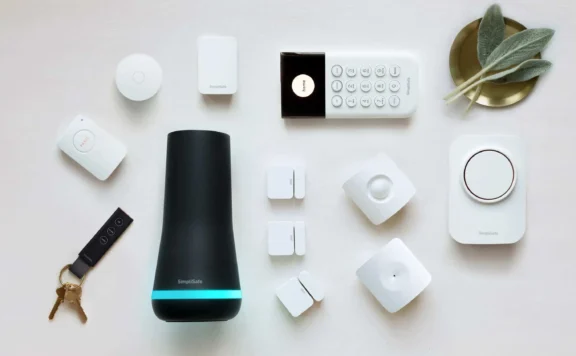
SimpliSafe’s current package support page identifies current package components and notes that some camera-intervention features require an eligible camera and selected professional monitoring. Its monitoring-plan page is the right starting point for current service choices. Save the dated cart, exact equipment, plan, trial, taxes, shipping, return terms, warranty, and permanent no-plan behavior.
Alder’s current official site and home-security page describe monitored response and 24/7 monitoring. Those public pages do not replace the signed proposal. Require the seller to write the equipment price, installation, monthly service, initial term, renewal, financing, ownership, warranty, service visits, move, transfer, cancellation, account release, and every promised feature into the agreement.
SimpliSafe vs Alder at a glance
| Decision | SimpliSafe record | Alder record |
|---|---|---|
| Buying route | Dated direct cart or assisted build with exact base station, keypad, sensors, cameras, accessories, and selected plan | Dated property proposal and agreement with seller, installer, panel, sensors, cameras, communicator, monitoring company, service, and ownership |
| Direct alarm sensing | Exact entry, motion, glass, environmental, and life-safety devices selected for each approved zone | Every quoted zone, device, type, supervision method, battery, tamper behavior, programming, and monitoring acceptance |
| Local warning | Base station and any added warning device tested for the selected event, mode, duration, volume, battery, and no-phone behavior | Panel, siren, keypad, panic route, volume, duration, battery, silencing authority, and behavior without an app or internet |
| Cameras | Exact camera model, recording service, intervention eligibility, storage, retention, export, audio, privacy, viewers, and permanent state | Exact quoted camera, recorder or cloud route, recording start, retention, export, audio, privacy, viewers, service, and permanent state |
| Monitoring | Selected plan, communicator path, signal receipt, verification, cancellation, dispatch limit, emergency address, permit, trial, and end state | Monitoring company, receiver path, signal receipt, verification, cancellation, dispatch limit, emergency address, permit, term, and restoration |
| Exit and ownership | Equipment ownership, plan end, account change, reset, transfer, data export, and permanent local functions | Equipment ownership, financed balance, service end, cancellation, renewal, account release, installer code, transfer, move, and takeover |
Build two equal property designs
Draw every exterior door, accessible window, garage opening, gate, camera route, blind approach, lock, keypad, smoke and carbon-monoxide boundary, leak risk, network path, power source, resident, guest, responder, and recovery owner. Give each job a pass condition before requesting prices.
- Direct state: the correct opening or condition is identified without inferring it from a camera box or general motion event.
- Local warning: the named warning reaches required occupied areas without depending on one phone, television, smart speaker, or internet connection.
- Evidence: the lawful camera view produces a useful frame, correct timestamp, recording, playback, retention, export, and removed-viewer result.
- Response: an approved test proves communicator delivery, station receipt, verification, cancellation, dispatch limits, emergency address, permit, and restoration where monitoring is purchased.
- Recovery: a second authorized person can operate, test, silence, cancel, export, remove a user, contact service, and restore the account without the primary phone.
The DIY versus professional guide helps separate installation from monitoring and response. Use the no-contract system guide when service flexibility is a hard requirement.
Compare direct sensing, warning, cameras, and response separately
- Trigger every approved direct zone 10 times. Save the physical state, correct name, mode, local warning, app event, communicator signal, monitoring receipt where selected, trouble, restoration, and every miss or duplicate.
- Listen for the named warning in sleeping, living, garage, detached, and accessible areas with doors closed and ordinary noise present. Keep hearing, accessibility, pets, neighbors, and local rules in the test plan.
- Walk every approved camera route by day and in low light. Save the physical privacy boundary, first useful frame, recording start, timestamp, storage, measured retention, playback, export, audio state, and removed-viewer result.
- Use approved monitoring test mode. Record station receipt, verification, cancellation, dispatch limit, emergency address, permit, restoration, and clean exit.
- Write who responds to a camera-only event, direct alarm event, local warning, failed video path, communications trouble, false alarm, unavailable owner, and account failure.
Test internet, power, device, service, and owner failures
| Failure | Required record | Pass condition |
|---|---|---|
| Internet unavailable | Direct zones, local warning, cameras, local recording, app, remote access, communicator, monitoring receipt, missed events, clock, reconnect, and restoration | Local and monitored functions match the written design, and every lost remote or video job is explicit |
| Building power lost | Panel or base station, keypad, sensors, sirens, communicator, cameras, network, batteries, runtime, trouble, recharge, restart, and lost interval | Required warning and communications continue for the documented period and restore cleanly |
| One device or controller fails | Supervision, health warning, replacement owner, configuration, pairing, service route, monitoring state, evidence, and recovery time | A second authorized person can identify the failure and restore the required job |
| Paid service ends | Sensing, arming, warning, app, notifications, cameras, recording, history, users, remote access, monitoring, support, firmware, data, and account release | The permanent state matches the dated pre-purchase worksheet |
| Primary owner unavailable | Second administrator, physical access, alarm control, monitoring contacts, service contacts, bills, export, cancellation, and account recovery | The household can secure the property and handle an incident without the primary device |
Read the SimpliSafe cart and Alder agreement line by line
For SimpliSafe, record the exact equipment total, discount, shipping, tax, return window, warranty, installation choice, selected monitoring plan, trial, billing date, camera-service requirements, optional add-ons, and what remains when service ends. The current SimpliSafe review can help organize the product questions, but the dated cart and support pages control the purchase record.
For Alder, record the seller, installer, equipment price, installed devices, monthly service, term, renewal, financing, monitoring company, communication paths, service visits, warranty, permits, cancellation, early-exit calculation, move, transfer, ownership, installer access, account release, and data. Compare every spoken claim with the signed text. The Alder review is background, not a substitute for the agreement.
Calculate three-year cost from dated documents
Do not copy a national “starting price” into the final result. Calculate each complete design from the actual property records:
Three-year cost = equipment + installation + tax and shipping + 36 months of required service + permits + expected batteries and replacements + network or storage work + likely service visits + exit or transfer costs.
Run at least three service states: selected plan for 36 months, a permitted lower plan or no-plan state, and an early move or cancellation. Mark every assumption. If a cost or ownership condition is not written, treat it as unresolved.
55-minute SimpliSafe vs Alder acceptance test
- Reconcile the property map against the final cart, proposal, agreement, device list, services, users, networks, power, responders, and recovery owners.
- Trigger every direct zone 10 times and verify the physical state, correct name, local warning, app event, communicator signal, station receipt where purchased, trouble, and restoration.
- Walk every camera route by day and in low light. Save privacy, first useful frame, recording start, timestamp, retention, playback, export, audio, and viewer removal.
- Run the approved monitoring test and the documented internet and power-loss paths. Record station receipt, failover, cancellation, missed-event limits, restoration, and clean exit.
- End trials in the worksheet, remove one temporary user, make the primary owner unavailable, and give the record to a second administrator. Prove permanent functions, incident handling, cancellation, transfer, and recovery.
Where Abode fits
Buyers who want directly purchased sensors, smart-home compatibility, and optional professional monitoring should also price Abode’s Smart Security Kit and current plans. Compare it against the same property map, permanent state, outage, response, ownership, and three-year cost tests. Do not award a win for a feature label without an exact device and passed test.
SimpliSafe vs Alder FAQ
Does SimpliSafe require professional monitoring?
Use SimpliSafe’s current monitoring-plan support page to record available plan and no-plan states on the purchase date. Write which sensing, warning, app, camera, recording, history, user, remote, and support functions remain after a trial or paid plan ends.
Should I accept an Alder quote over the phone?
Do not make the final decision from a call alone. Require the complete property proposal and agreement, then verify equipment, installation, monitoring, term, renewal, financing, ownership, service, cancellation, move, transfer, account release, and every promised feature in writing.
Which company has the better camera system?
Compare exact camera models and services. Test lawful view, first useful frame, recording start, timestamp, low light, audio, storage, retention, playback, export, users, privacy, service end, and failure recovery. A general brand claim cannot answer those jobs.
What is the biggest decision?
The biggest decision is not DIY versus professional installation. It is whether the complete property design, response path, permanent service state, ownership record, failure recovery, and three-year cost fit the household.