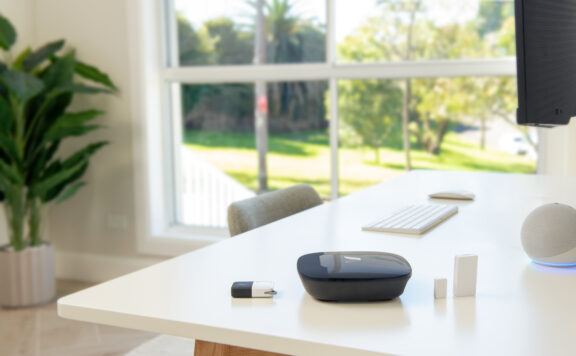
Vacation homes need a different security plan than primary homes. The system has to catch the basics when nobody is nearby: unlocked doors, water leaks, package drop-offs, garage access, and outdoor motion. For Apple households, the best HomeKit setup is usually a security hub plus HomeKit-friendly cameras, locks, sensors, and automations.
This guide is for cabins, beach houses, guest cottages, and second homes where remote alerts matter more than daily arming habits. The goal is a setup that can still be checked from a phone, shared with family or cleaners, and upgraded with monitoring if the property has higher risk.
Quick picks
- Best overall HomeKit security base: Abode, because it pairs a real alarm system with Apple Home support and optional monitoring.
- Best HomeKit camera layer: Eve, Aqara, or Logitech Circle View cameras for properties where Apple Home app control is the priority.
- Best low-cost sensor layer: Aqara hubs and contact sensors for doors, windows, cabinets, and utility rooms.
- Best lock add-on: HomeKit-compatible smart locks with unique guest codes for cleaners, guests, and property managers.
What vacation homes need from HomeKit security
A vacation home security system should cover four jobs:
- Entry alerts: doors, sliders, windows, garage doors, and storage rooms.
- Visual verification: driveway, porch, side entry, and interior common area cameras where privacy rules allow.
- Access control: smart locks or keypad locks with guest-specific codes.
- Condition alerts: water leaks, smoke, temperature swings, and power or internet issues.
HomeKit is strong for the control layer. It lets Apple users see devices in one app, build automations, and share access with family. It is not always a full alarm replacement on its own, which is why vacation homes often need a real alarm hub underneath.
Best overall: Abode with Apple Home
Abode is the strongest fit when the vacation property needs both HomeKit control and alarm-system structure. It can support entry sensors, motion sensors, cameras, keypads, and optional professional monitoring without locking the buyer into a traditional contract path.
Use Abode when the property has multiple doors, detached storage, or periods where nobody can respond quickly. Add HomeKit automations for lights, locks, and cameras, but keep the alarm hub as the security backbone.
Best camera-first HomeKit setup
If the property is lower risk and the buyer mainly wants visibility, HomeKit cameras can work well. Place cameras at the front approach, driveway, and any side entrance. Avoid private indoor spaces in guest rentals; use exterior coverage and entry sensors instead.
For readers comparing camera-led setups, the related guide to Apple Home security cameras is the next step.
Best low-cost sensor setup
Aqara-style sensors are useful when the property needs broad coverage without a large monthly cost. Door and window sensors can cover sliders, sheds, utility closets, and locked owner storage. Add leak sensors near water heaters, sinks, dishwashers, and laundry rooms.
The tradeoff is response. Low-cost sensors are great for alerts, but someone still has to act on those alerts. If the property is far away, consider monitoring or a local property manager workflow.
Smart locks and guest access
Vacation homes usually need lock codes more than keys. Create separate codes for family, cleaners, trades, and guests. Remove codes after each stay, and pair the lock with a door sensor so you know whether the door actually closed.
For lock-specific planning, see the smart lock security checklist.
No-subscription vs monitored setups
A no-subscription HomeKit setup can work for nearby second homes where the owner, neighbor, or property manager can respond quickly. For remote homes, monitored alarm coverage is worth considering because an alert with no response plan is just a notification.
Readers trying to avoid fixed fees should compare this with home security systems without monthly fees. For rural properties with unreliable internet, also check home security systems without Wi-Fi.
Vacation-home setup checklist
- Put contact sensors on every exterior door, slider, and accessible window.
- Add water-leak sensors before adding extra cameras.
- Use cameras for approaches and driveways, not private guest spaces.
- Create separate smart-lock codes for every recurring user.
- Build HomeKit automations for lights, arrival routines, and late-night motion.
- Decide who responds when an alert comes in.
- Test the system after power loss and internet outages.
Bottom line
The best HomeKit security setup for a vacation home is not just a camera in the Apple Home app. It is a layered system: sensors for entry, cameras for verification, locks for access control, leak sensors for property damage, and a clear response plan. Abode is the best alarm-first base for Apple households, while HomeKit cameras and Aqara-style sensors can fill specific gaps around it.
Sources checked June 4, 2026: Apple Home app information, Abode Apple Home/HomeKit compatibility information, Aqara smart home security product pages, Eve Home camera and sensor pages, and related Home Security Reviews internal guides.
June 2026 next reads for HomeKit vacation-home security
Vacation homes need HomeKit security that works when nobody is nearby. After choosing a HomeKit-friendly system, the next decision is whether the property needs stronger monitoring, better camera placement, or a simpler no-monthly-fee setup.
- For the broader remote-property shortlist, read home security systems for vacation homes.
- For small-business owners managing an office or shop with Apple Home, compare HomeKit security systems for small businesses.
- For compact spaces, use HomeKit security systems for small apartments.
- For the main Apple Home shortlist, read best HomeKit security systems.
For Abode shoppers, start with the Smart Security Kit, add Abode Cam 2 where remote video verification helps, and compare Abode plans before leaving a vacation property on self-monitoring only.
Build a vacation-home away-state record
A HomeKit label does not prove that a second home will detect the right opening, record a lawful view, warn a nearby person, reach an owner, survive a network failure, or recover when the primary phone is unavailable. Record the physical property, Abode alarm zones, Apple Home rooms and accessories, native vendor apps, cameras, locks, water sensors, network, power, users, responders, services, and owner separately.
Use Apple’s home-hub record and Home sharing and user record as Apple-side starting points. Use Abode’s Smart Security Kit and current plans for the alarm and optional-response side. Save the exact purchased, trial, permanent unpaid, monitored, and ended-service states.
| Second-home job | Exact record | Pass evidence |
|---|---|---|
| Know a door or window opened | Physical opening, direct contact, alarm zone, mode, delay, local warning, event, communication, and response | 20 open-close cycles per direct zone with correct names |
| Know water reached a risk point | Sensor location, direct or bridge path, local warning, remote event, shutoff plan, responder, and replacement interval | Approved wet test and absent-owner response |
| Record a lawful approach | Camera, view, privacy boundary, power, network, recording, retention, export, users, and service | Ten day and ten low-light walks per view |
| Control cleaner or guest access | Door, lock, local credential, named person, start, expiry, battery, emergency entry, removal, and handover | Allowed, denied, expired, offline, low-battery, and removed-user tests |
| Reach someone nearby | Local keyholder, verification rule, travel time, keys, codes, alarm authority, evidence access, and escalation | Tabletop incident without the owner |
| Recover ownership | Second administrator, trusted contact, local controls, vendor accounts, recovery methods, inventory, and reset plan | Second person completes alarm, access, evidence, and recovery routes |
Separate physical, alarm, Apple Home, and automation states
For every protected opening, write four rows: the physical state, the direct alarm-zone state, the Apple Home accessory state, and any automation output. A closed tile, completed scene, camera alert, or lock event does not prove a direct alarm zone is closed, armed, communicating, or able to produce the intended warning and response.
Use the zone-naming guide so alarm zones, Apple Home rooms, camera views, responder instructions, and handover records describe the same place. Use the HomeKit account-recovery guide before the owner travels.
Departure and arrival checklists
| Stage | Record before accepting the state |
|---|---|
| Seven days before departure | Firmware changes, batteries, direct zones, cameras, storage health, locks, water sensors, router, home hubs, backup power, contacts, plans, and open support cases |
| Departure day | Physical doors and windows, alarm mode, bypasses, lock state, lawful views, recording, retention, water risks, heat or freeze plan, guest codes, keyholder, and owner contact |
| First remote check | Direct alarm history, Apple Home accessory freshness, camera timestamps, storage health, lock users, network state, power state, and second-admin access |
| Incident | Exact zone or view, verification, local warning, monitoring receipt if purchased, keyholder route, emergency threshold, evidence protection, and owner update |
| Arrival | Entry path, alarm disarm, physical inspection, lock and code reconciliation, camera privacy state, missed events, power and network history, and maintenance list |
Network, power, and stale-state map
- Draw the alarm hub, Apple home hubs, bridges, cameras, locks, water sensors, router, access points, recorder or local storage, electrical panel, backup power, and every radio, cable, and cloud hop.
- For each accessory, record whether the Apple Home tile comes from a direct radio, bridge, vendor account, camera, lock, or alarm integration. Do not call all accessory paths the alarm path.
- Disconnect internet during an approved test. Record direct zones, local warning, local credentials, recording, Apple Home state, native apps, remote alerts, clocks, queued events, and restoration.
- Make one home hub or bridge unavailable. Record stale-state wording, automation behavior, alarm independence, user understanding, recovery owner, and reconnect order.
- Measure backup runtime for the alarm hub, router, access point, bridges, cameras, storage, and approved environmental equipment. A battery icon is not a property-level runtime record.
Users, privacy, service end, and ownership
Use named identities for owners, family, guests, cleaners, trades, property managers, and local responders. Record who can arm, disarm, unlock, watch, export, delete, change automations, invite users, change services, reset equipment, or recover accounts. Remove one test user and prove former Apple Home access, vendor sessions, lock codes, alarm control, camera access, shared clips, invitations, and recovery methods fail.
Record lawful camera views, neighboring-property boundaries, guest-space privacy, audio rules, indicators, retention, sharing, and deletion. Write the permanent state after each optional alarm, recording, or remote service ends. Record who owns the equipment, accounts, codes, recordings, network, services, warranties, installation map, recovery methods, and responder instructions.
60-minute vacation-home acceptance test
- Minutes 0-10: reconcile physical openings, direct zones, Apple Home accessories, cameras, locks, water sensors, home hubs, bridges, network, power, users, services, responders, and recovery.
- Minutes 10-24: trigger each direct zone and approved water test; record names, modes, delays, warning, history, communications, bypasses, trouble, duplicates, and misses.
- Minutes 24-36: walk lawful camera views, protect and export a clip, and test allowed, denied, expired, offline, low-battery, and removed-user access.
- Minutes 36-48: disconnect internet and one approved home hub or bridge; compare local protection, stale Apple Home state, remote failures, clocks, queued events, and restoration.
- Minutes 48-55: make the primary phone unavailable and have the second administrator complete the alarm, access, evidence, and recovery routes.
- Minutes 55-60: sign departure, permanent-service, privacy, ownership, keyholder, handover, three-year cost, and maintenance records.