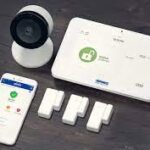
Brinks Home (formerly Monitronics) is a professionally installed home security provider with 24/7 monitoring, cellular backup, and the trust of an iconic American security brand. But in 2026, Brinks’ high monthly costs ($40–$50/mo), mandatory contracts, and lack of a DIY option make it hard to recommend over modern alternatives. Here’s the full breakdown.
Quick Specs
| Feature | Details |
|---|---|
| Installation | Professional only — no DIY option |
| Monthly Cost | $39.99–$49.99/mo |
| Contract | 3-year minimum (typical) |
| Equipment Cost | Custom quotes — starts around $500+ |
| Monitoring | 24/7 professional with cellular backup |
| Smart Home | Alexa, Google Assistant — no HomeKit |
| Cameras | Yes (indoor/outdoor), no video verification |
| Battery Backup | 24-hour panel backup |
Monitoring Plans
| Plan | Monthly Cost | Includes |
|---|---|---|
| Standard | $39.99/mo | 24/7 monitoring, cellular backup, app control |
| Premium | $49.99/mo | Everything above + smart home automation, remote video |
Both plans require a multi-year contract. Professional installation may be “free” on the Premium plan if equipment exceeds $500.
Pros
- Trusted brand name: Brinks has been in security since 1859 — strong brand recognition and trust factor
- 24/7 professional monitoring: Every system comes with cellular backup and battery backup — no gaps in coverage
- Professional installation: Technician sets up everything — no tools or DIY required
- Business security: Brinks covers both residential and commercial — unusual for home security companies
- Responsive app: The Brinks Home app works well on iOS and Android for arming/disarming and alerts
Cons
- Expensive monitoring: $40–$50/mo is 2–3x what Abode ($6–$20/mo) or SimpliSafe ($20–$28/mo) charge
- Long contracts: 3-year contracts with early termination fees — a dealbreaker in 2026
- No DIY option: You can’t buy online and self-install. Must schedule a technician visit.
- No HomeKit: Only Alexa and Google. Apple users should look at Abode (full HomeKit support)
- No video verification: Despite having cameras, Brinks doesn’t verify alarms via video — competitors like ADT and Abode do
- Opaque pricing: No prices listed online. Must call for a custom quote. In 2026, this feels outdated.
Brinks vs Alternatives
| Feature | Brinks | Abode | SimpliSafe | ADT |
|---|---|---|---|---|
| Monthly Cost | $39.99–$49.99 | $0–$20 | $0–$27.99 | $28.99–$59.99 |
| Contract | 3 years | None | None | 3 years (some plans) |
| Installation | Pro only | DIY | DIY or Pro | Pro or DIY |
| HomeKit | ❌ | ✅ | ❌ | ❌ |
| Free Plan | ❌ | ✅ | ✅ | ❌ |
| Video Verification | ❌ | ✅ | ❌ | ✅ |
3-Year Cost Comparison
Here’s what you’d actually pay over 3 years:
| Provider | Equipment | Monthly | 3-Year Total |
|---|---|---|---|
| Brinks (Standard) | ~$500 | $39.99 | $1,939.64 |
| Brinks (Premium) | ~$500 | $49.99 | $2,299.64 |
| Abode (Connect+) | $199 | $20 | $919 |
| SimpliSafe (Interactive) | $249 | $27.99 | $1,256.64 |
Bottom line: Brinks costs $1,000–$1,400 more than Abode over 3 years for comparable monitoring.
Who Should Consider Brinks?
- Homeowners who want zero DIY involvement — everything professionally installed and maintained
- Businesses needing commercial-grade security with professional monitoring
- People who value brand recognition and trust over cost savings
Who Should Skip Brinks?
- Budget-conscious buyers — Abode and SimpliSafe offer equivalent monitoring for half the price with no contracts
- Apple/HomeKit users — Abode is the best HomeKit-compatible system
- Renters — contracts and pro-install don’t suit temporary living situations
- DIY enthusiasts — Brinks offers zero self-install flexibility
Brinks Home in 2026: What’s New
Brinks has made small moves this year, but the fundamentals remain the same:
- Alarm.com ADC-SVR122 hub now standard — New installations ship with the latest Alarm.com Smart Hub, bringing improved Z-Wave Plus range, faster sensor pairing, and support for 2GIG Edge panels. The monitoring experience is now technically on par with any top-tier Alarm.com dealer.
- Video verification on Premium plan — Premium subscribers ($39.99/mo) get AI-powered video verification: when the alarm triggers, operators can view camera footage before dispatching police. This reduces false alarm fines and speeds response. A welcome feature, though Abode offers similar capabilities at $20/mo.
- Pricing unchanged — Standard ($29.99/mo) and Premium ($39.99/mo) with mandatory 36-month contracts. No free or self-monitoring tier. No price reductions despite increasing DIY competition.
- Still no HomeKit or Matter — Brinks remains limited to Alexa and Google. With Abode now supporting Matter alongside HomeKit, Z-Wave, and Zigbee, Brinks falls further behind on smart home interoperability.
- BBB complaints persist — The most common themes: billing disputes, contract cancellation difficulties, and long hold times reaching the cancellation department. The BBB rating holds steady at B.
Our take: Brinks is modernizing its tech stack via Alarm.com upgrades, but the 36-month contracts and $30-40/month pricing make it hard to recommend when Abode’s Smart Security Kit delivers comparable monitoring at half the 3-year cost with no contract.
Brinks Monitoring and Contract Check for 2026
Brinks is strongest for shoppers who want a traditional monitored alarm with professional support, but the buying decision still comes down to contract terms, monthly price, and how much control you want after installation. Before signing, confirm whether the quote includes equipment financing, activation fees, permit support, cellular backup, video storage, and cancellation language.
| Decision Point | What to Check | Why It Matters |
|---|---|---|
| Contract length | Month-to-month vs multi-year agreement | A lower upfront price can hide a longer total commitment. |
| Monitoring tier | Intrusion only, video, smart home, or cellular backup | The advertised monthly price may not include every feature. |
| Equipment ownership | Purchased outright or financed | Financing can make cancellation more expensive. |
| DIY flexibility | Can you add sensors and cameras yourself? | Homes change, and a rigid system costs more over time. |
If you want no-contract monitoring and more smart-home flexibility, compare Brinks against Abode, SimpliSafe, and Ring Alarm before deciding.
2026 no-contract alternatives to check before signing Brinks
Before committing to a multi-year Brinks agreement, compare the same home against a few no-contract and smart-home paths. Start with our best no-contract home security systems guide if cancellation flexibility matters, then use the no-subscription renter systems guide if you want alerts without a required monitoring bill.
- HomeKit security for shared houses — useful if Brinks feels too rigid for roommates, guest codes, or private-room boundaries.
- Storage-room security systems — compare lower-cost sensor coverage for closets, inventory rooms, and hobby storage.
- Workshop security systems — check how DIY sensors, cameras, and sirens protect tools without a long contract.
- Security camera privacy guide — review recording, shared-user access, and subscription controls before adding Brinks cameras.
FAQs
Does Brinks require a contract?
Yes. Most Brinks plans require a 3-year monitoring contract with early termination fees. This is one of the biggest downsides compared to no-contract providers like Abode and Cove.
Can I self-install Brinks?
No. Brinks is professional-install only. For DIY security, check Abode, SimpliSafe, or Ring.
Is Brinks the same as Monitronics?
Yes. Monitronics rebranded to Brinks Home in 2018 after licensing the Brinks name. The company went through bankruptcy in 2019 but has continued operations under the Brinks Home brand.
How does Brinks compare to ADT?
Both are pro-installed with contracts. ADT is more expensive ($29–$60/mo) but offers video verification and a wider dealer network. For the money, Abode offers better value than either with no contract required.
Related Reviews & Comparisons
Brinks Comparisons
- Ring vs Brinks 2026 — Amazon DIY vs legacy alarm company compared
- Brinks vs Vivint 2026 — Two contract-based providers: pricing, equipment & why DIY saves more
Pro-Install Competitors
- ADT Review 2026 — Brinks’ closest pro-install competitor
- Vivint Review 2026 — Premium smart home + security alternative
- Alder Review 2026 — Pro-installed budget competitor with long contracts
No-Contract DIY Alternatives
- Abode Review 2026 — Best no-contract system with HomeKit, $0–$20/mo
- SimpliSafe Review 2026 — Mainstream DIY with Fast Protect monitoring
- Cove Review 2026 — Budget monitoring at $17.99/month, no contract
- Ring Review 2026 — Amazon ecosystem with camera-first approach
Comparisons & Buying Guides
- Cove vs SimpliSafe 2026 — Budget DIY systems head-to-head
- Alder vs Abode 2026 — Contract vs no-contract comparison
- DIY vs Professional Home Security — Guide to choosing between contract and no-contract
- Best No-Contract Security Systems — Top picks with zero commitments
- Best HomeKit Security Systems — If smart home integration matters
More Comparisons
If Brinks’ long contracts aren’t for you, check out our best smart home security systems for 2026 — we compare every major DIY and pro-install option side by side.
Need cameras without monitoring fees? Our Wyze review and Blink review cover the best budget options.
Related buyer guides
2026 Brinks contract-risk checklist
- Confirm contract length and cancellation penalties before equipment financing is finalized.
- Compare Brinks against no-contract alternatives using a 36-month total-cost model, not just first-month promo pricing.
- Validate camera/cloud dependencies up front so monthly cost drift does not surprise you after setup.
Related reads: Ring vs Brinks 2026, Brinks vs Vivint 2026, and best no-subscription systems.
2026 comparison and buyer-path links
- Home security buying guide — use this to compare sensors, cameras, monitoring, contracts, and backup before choosing a system.
- Best no-contract home security systems — compare flexible alternatives before signing a long monitoring agreement.
- Best battery-backup security systems — check outage behavior, cellular backup, and alerts.
- Security camera privacy guide — review recording, shared-user access, and subscription controls before adding cameras.
2026 related guides: storage rooms, workshops, detached garages, side-door locks 2026050315
- Best security systems for storage rooms
- Best security systems for workshops
- Best security systems for detached garages
- Best smart locks for side doors
June 2026 refresh: contract risk vs no-contract alternatives
Brinks still deserves a hard comparison against no-contract systems because the risk is not only the monthly monitoring price. The bigger buyer risk is stacking monitoring, equipment financing, cancellation friction, and smart-home limits into one long commitment.
- Check the total term cost before comparing Brinks against DIY systems with optional monitoring.
- Separate equipment from monitoring so a discount on one line item does not hide a higher long-term bill.
- Ask what happens at move-out because renters, shared houses, and apartments need portable gear and fast user resets.
- Choose a no-contract path when the household wants sensors and alerts first, with monitoring only after the setup proves itself.
Related no-contract paths: renters with roommates, shared houses, and apartment renters. For a contract-free Abode setup, compare the Abode Smart Security Kit and Abode plans before accepting a longer monitoring commitment.
Brinks owner operating path: test the service before judging the contract
A Brinks quote or agreement does not prove that the installed system, monitoring account, cameras, contacts, and household response plan work together. Use the current provider documents for prices and terms, then test the property as an operating system. This path connects the contract decision to the checks owners need before installation sign-off, renewal, a move, or cancellation.
1. Match every installed device to the written schedule
Walk every exterior door, accessible window, motion area, keypad, siren, camera, smoke or CO path, leak sensor, and communication device. Use durable zone names such as “garage-to-house door” rather than installer shorthand. Mark devices that are offline, bypassed, low-battery, missing from the agreement, or present in the app without a clear job.
Record changes in the home security system change log. It gives each equipment, user, firmware, network, and automation edit an owner, test result, and rollback step. A change record matters when a later false alarm, missed event, or billing dispute involves several edits.
2. Prove direct alarm state before relying on cameras
Open each protected door and window in provider-approved test mode. Confirm the physical opening, zone name, panel state, app event, local warning, monitoring signal, cancellation, and restoration. Test ajar and reopened states where the hardware supports them.
A camera clip can support review, but it does not replace proof that a direct alarm zone changed state. Use the home security monitoring test checklist to document the exact signal, timestamp, communication path, contact order, and operator result. Never create a false dispatch.
3. Reconcile the monitoring account and local permit
Compare the service address, unit, panel or account number, permit or registration number, contact order, phone numbers, passcodes, keyholders, pets, and access notes across the provider account and local authority record. Rules vary by jurisdiction, and not every property needs the same registration.
The alarm permit and dispatch readiness checklist covers renewal, address changes, false-alarm rules, moves, approved testing, and contact reconciliation. Confirm current requirements with the responsible city, county, police, fire, or alarm authority.
4. Test internet, power, cellular, and restoration
Disable home internet without cutting local power. Record panel, keypad, direct-zone, siren, camera, app, cellular, and monitoring behavior. Then restore internet and check that trouble states clear, cameras return, zones are not silently bypassed, and the monitoring account sees the expected recovery.
Use the backup internet guide to separate local alarm behavior, remote app access, camera uploads, automation, and monitoring communication. They can fail differently. Run a safe power-loss check under current manufacturer and provider instructions without unnecessarily draining backup batteries.
5. Fix false alarms instead of teaching people to ignore alerts
Repeated false alarms often point to poor sensor fit, door movement, incorrect zone type, unsuitable delay, pet interaction, weak batteries, loose mounting, old contacts, user confusion, or a routine that changes alarm state unexpectedly. Do not solve those faults by bypassing a zone indefinitely.
Use the false-alarm reduction checklist to capture the time, zone, physical cause, armed mode, user action, weather, network state, and final repair. Retest the exact event after every change.
6. Audit the subscription before renewal
Separate monitoring, cellular, camera recording, verification, automations, equipment financing, service visits, warranties, and app features. A household may need some of those jobs and not others. Do not compare a monitored alarm with a camera-only self-response plan as though the scope is equal.
The home security subscription renewal audit maps every recurring charge to installed equipment, evidence, account access, contacts, outage behavior, and a tested response job. It also separates a trial from the permanent plan state and gives renew, downgrade, change, and cancel decision gates.
7. Build the exit before canceling
Monitoring, equipment financing, camera storage, an extended warranty, and app-store billing can be separate obligations. Confirm equipment ownership, payoff, notice method, effective date, return requirements, access to history, and what the system does after service ends.
Use the monitoring cancellation checklist to protect continuity. Install and test the replacement path before the old one is removed. Save cancellation confirmation, export evidence that will expire, remove provider access where appropriate, and test the final paid or unpaid state.
8. Give every alert a response owner
Professional monitoring does not remove household duties. Someone must maintain contacts, answer provider calls, manage codes, replace batteries, review cameras, handle outages, and meet a technician. For self-response or a partial service state, the assignment becomes even more important.
Use the home security alert escalation plan to name the primary responder, backup, acknowledgement deadline, safe verification limit, evidence route, and stop condition for each event. A push alert sent to several phones is not the same as accepted responsibility.
30-minute Brinks owner route test
- 0–5 minutes — paperwork: match address, agreement, device schedule, monitoring account, permit, contacts, financing, and renewal date.
- 5–12 minutes — direct zones: trigger selected door, window, motion, keypad, and siren tests under the provider-approved process. Record names and restoration.
- 12–18 minutes — response: prove the monitoring or self-response contact order, backup owner, safe cancellation, and acknowledgement path.
- 18–24 minutes — failures: test internet loss and one safe phone or power failure. Distinguish offline, trouble, bypass, and secure states.
- 24–28 minutes — evidence and access: download one harmless camera clip, audit current users and codes, and remove one expired test credential.
- 28–30 minutes — closeout: log faults, assign owners and deadlines, confirm the next test, and save the current plan and cancellation records.
Do not accept the system unchanged if an opening is unnamed, a failed path looks secure, a monitoring signal cannot be tested, the permit or address is wrong, former users retain access, evidence cannot be exported, or the contract and equipment ownership remain unclear.