
Checked August 11, 2026. This is a source-based buying and operating comparison, not a hands-on test. Ring and Cove can change kits, devices, plans, storage, monitoring, integrations, discounts, terms, and regional availability. Build a dated bill of materials from each current checkout and save the plan terms that apply to the service address.
Short answer: Ring is the clearer fit when cameras, video doorbells, app-based video, and the Amazon ecosystem are the main job. Cove is the clearer fit when the main job is a DIY alarm with direct sensors and a professional monitoring path. Neither wins on a headline discount or one monthly figure. Compare the same openings, detectors, cameras, storage, response level, people, outages, and ownership period.
Ring vs Cove 2026 decision table
| Decision | Ring | Cove |
|---|---|---|
| Primary job | Camera, doorbell, alarm, and app ecosystem built around the selected Ring devices and plan | DIY alarm package with direct sensors, local warning, and the selected monitoring service |
| Best starting buyer | Camera-first household that wants video at entrances and exterior approaches | Sensor-first household that wants an alarm and documented professional response |
| Evidence | Selected camera events, live view, recordings, alarm-zone events, and account history | Selected alarm-zone events, panel state, monitoring records, and any included camera path |
| Buying unit | Exact alarm kit, cameras, accessories, and Ring plan | Exact Cove package, added devices, installation choice, and service plan |
| Critical failure test | Internet, power, camera, storage, account, and alert-chain behavior | Internet, power, panel, sensor, communication, monitoring-contact, and alert-chain behavior |
| Do not assume | One camera proves an opening, alarm state, or complete incident | One monitored sensor provides the video coverage or history of a camera system |
Start with the property job, not the brand
Draw the home before opening either cart. Mark exterior doors, accessible windows, garage entries, upper-floor access, camera views, privacy boundaries, smoke and carbon-monoxide needs, leak risks, pets, residents, guests, internet equipment, power supplies, and the people who can respond. For every location, write the security job:
- detect an opening with a direct contact;
- detect movement in a defined interior area;
- warn occupants with a local siren or other local indication;
- record video within a lawful, useful field of view;
- send an alert to a named owner and backup;
- escalate an alarm through the selected monitoring and verification process;
- recover safely after internet, power, phone, battery, or account failure.
Do not compare unequal scopes. A Ring cart with several cameras and a Cove cart with only entry sensors are not equivalent. Match direct zones, video views, life-safety jobs, local warning, monitoring level, storage period, communication paths, user count, warranty, and ownership horizon first.
What to record from Ring
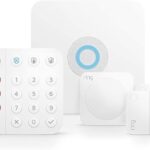
Use the current Ring site to choose the exact regional alarm, camera, doorbell, sensor, and accessory models. Use the current Ring plans page to record the service attached to the address and account. A product-family name is not a full specification.
- base station, keypad, contact, motion, glass-break, panic, environmental, camera, doorbell, light, chime, and accessory model numbers;
- included power supplies, batteries, mounts, network requirements, radio paths, and any backup communication;
- live-view, recording, storage, detection, sharing, download, alarm, monitoring, and support functions under the chosen plan;
- permit, verification, dispatch, contact-order, cancellation, renewal, trial, and service-address rules;
- the functions that remain when the paid plan ends, internet fails, or a camera is offline;
- equipment, service, shipping, tax, installation, replacement, and cancellation cost.
What to record from Cove
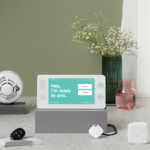
Use the current Cove site to capture the exact package offered for the address. Save the cart, device schedule, service name, monitoring scope, installation choice, communication path, trial, warranty, cancellation terms, discounts, and post-service state. Do not treat a promotional percentage as the permanent equipment price.
- panel or hub, keypad, contact, motion, glass-break, panic, smoke, carbon-monoxide, leak, camera, and accessory model numbers;
- which devices report direct alarm zones and which devices provide only video or app awareness;
- local siren, app alert, backup communication, monitoring, verification, contact, and dispatch paths;
- camera recording, storage, detection, retention, sharing, and download functions when included;
- the plan, term, renewal, trial, cancellation, ownership, relocation, support, and permanent unpaid state;
- equipment, installation, service, shipping, tax, battery, repair, move, and cancellation cost.
Cameras and direct alarm zones answer different questions
A camera can show activity inside its view. A door contact can report whether the protected opening changed state. A motion detector can report activity within its detection pattern. An alarm mode tells the system how to handle supported zones. Keep those records separate.
Ring’s strongest case is a camera-led design where doorbells and exterior cameras are central to the household’s evidence and alert plan. Cove’s strongest case is a sensor-led alarm where direct zones and professional monitoring are central. Either system can include more than one device type, but buy the exact model for the exact job rather than assuming the brand name fills every layer.
For each camera, test field of view, privacy mask, audio, night image, first useful frame, motion zones, person or package labels when supported, recording trigger, pre-event context, storage, retention, download, timestamp, sharing, bandwidth, power, and offline alert. For each alarm sensor, test direct zone name, open and restore state, armed-mode behavior, entry delay, local indication, monitoring receipt in approved test mode, battery warning, tamper state, and offline behavior.
Monitoring needs a written event-and-response map
Professional monitoring is not one universal service. Save the exact events the selected Ring or Cove plan can receive, the verification method, call or message order, dispatch rules, permit requirements, false-alarm handling, test-mode process, cancellation path, and records available after an event.
Use the home-security monitoring test checklist after installation and after any plan, communicator, sensor, address, permit, or contact change. Test only through the provider’s approved process. A successful push notification does not prove that the monitoring center received the correct account, zone, address, and contact order.
Video storage and privacy
Write the recording destination and retention period for every camera. Distinguish live view, cloud clips, local recording, event history, and downloaded evidence. Confirm what stops when a plan ends and whether the account owner can export a usable clip before it expires.
Keep cameras on the household’s property and the minimum useful view. Avoid windows, doors, yards, audio, or daily activity that belongs to neighbours, tenants, workers, or a shared area without a lawful purpose and clear notice. The security-camera privacy guide covers placement, audio, access, retention, and evidence handling.
People, codes, accounts, and departures
Give each resident a named account when supported. Separate alarm permissions, camera viewing, clip sharing, device administration, billing, monitoring contacts, smart-home membership, voice-assistant access, and account recovery. Do not hand out the owner login or one permanent shared code.
| Person | Minimum access | Closeout |
|---|---|---|
| Resident | Only the alarm, camera, and response permissions needed | Remove accounts, codes, camera sharing, voice access, recovery, and physical devices |
| Guest | Temporary entry or alarm credential for the visit | Expire and test denial immediately after the visit |
| Carer or cleaner | Scheduled credential and the smallest useful response role | Review on every schedule or care-plan change |
| Installer | Time-limited commissioning access | Remove access, rotate temporary codes, and accept the handoff record |
| Backup responder | Contact details and safe access path | Confirm quarterly and after phone-number changes |
Alerts need owners, priorities, and deadlines
Do not send every motion clip and every sensor event to every person. Classify life-safety, confirmed intrusion, alarm, opening, camera, device trouble, battery, offline, and informational events. Assign a primary owner, backup, verification step, escalation time, and closeout record.
Use the home-security alert-delay test to measure push, SMS, call, Wi-Fi, cellular, background-app, and quiet-hour behavior. Late or missing alerts are operating failures, not minor app annoyances.
Internet, power, battery, and account failures
Test each dependency separately under safe conditions. Record what remains local, what needs internet, what uses backup communication, what stops without a paid service, how offline state appears, and how events reconcile after service returns.
- Internet loss: test local sensors, siren, keypad, camera recording, remote view, alerts, monitoring path, and recovery.
- Power loss: record backup duration, camera behavior, router and modem power, low-power alerts, safe egress, and restoration.
- Battery trouble: prove low-battery warnings, replacement procedure, spare inventory, timestamp, and restored state.
- Phone loss: remove the lost session, protect recovery, confirm a second administrator, and test alerts on the replacement phone.
- Account compromise: preserve evidence, change the primary email and password, review users and integrations, rotate codes, and retest.
- Plan cancellation: confirm the exact permanent camera, alarm, alert, storage, monitoring, and support state before the cancellation window closes.
Installation and commissioning
Temporary mounting is useful for testing, not for declaring completion. Check contact alignment, motion pattern, camera height and glare, Wi-Fi or radio signal, power, cable protection, tamper state, device names, zones, modes, delays, siren audibility, privacy, account ownership, and every alert path.
Keep a system change log with model, serial number, location, mount, owner, firmware, battery, network, plan, test result, and rollback notes. Save the checkout, invoices, plan terms, permit, monitoring certificate, installation photos, and final acceptance record.
Three-year cost at equal scope
Calculate cost from current carts and terms. Do not copy a stale monthly rate, assume a discount continues, or compare a single Ring camera with a whole-home Cove alarm.
| Cost line | Ring | Cove |
|---|---|---|
| Opening and interior detection | Exact alarm kit and added sensors | Exact package and added sensors |
| Video | Doorbells, cameras, lights, mounts, power, and storage plan | Included or added cameras, mounts, power, and storage plan |
| Response | Selected alarm or monitoring service, permits, and false-alarm exposure | Selected monitoring service, permits, and false-alarm exposure |
| Infrastructure | Network, backup power, installation, batteries, replacements, and support | Network, backup power, installation, batteries, replacements, and support |
| Commitment | Trial, renewal, cancellation, plan changes, and permanent unpaid state | Trial, renewal, cancellation, plan changes, and permanent unpaid state |
Use the same equipment map, response level, storage period, number of users, ownership horizon, replacement assumptions, and household labour. Model the expected case and one failure case: added camera, moved sensor, failed battery, changed internet, service visit, relocation, or early cancellation.
Who should choose Ring?
- Video doorbells and exterior cameras are the first priority.
- The household wants one Ring account for selected cameras and alarm devices.
- The exact regional plan, storage, monitoring, and unpaid state fit the operating plan.
- The household accepts the privacy, bandwidth, power, and account work of a camera-led system.
Who should choose Cove?
- Direct alarm sensors and professional response are the first priority.
- The current address-specific package includes the zones and life-safety jobs needed.
- The monitoring terms, communication path, contact order, and post-service state are acceptable.
- The household wants a sensor-led design and will add video only where it has a defined job.
60-minute Ring vs Cove acceptance test
- Minutes 0–5 — Record scope. Write models, zones, cameras, plans, storage, monitoring, permits, users, contacts, communication paths, and test-mode instructions.
- Minutes 5–12 — Test openings. Open and restore each approved contact. Confirm device name, direct state, armed-mode behavior, delay, local indication, and event history.
- Minutes 12–20 — Test cameras. Walk each approved path in daylight and low light. Check field of view, privacy, first useful frame, detection, recording, timestamp, retention, and download.
- Minutes 20–28 — Test alarm modes. Arm, disarm, trigger one safe zone in approved test mode, confirm local warning, and verify the correct monitoring receipt and contact order when included.
- Minutes 28–34 — Test people. Use resident and temporary credentials, camera permissions, and recovery. Remove one temporary user and prove that access ends.
- Minutes 34–40 — Test alerts. Measure one alarm, one camera event, one device-trouble event, and one low-priority event across the primary and backup phones.
- Minutes 40–47 — Test internet loss. Confirm local alarm behavior, camera recording path, offline warnings, remote failures, backup communication, and clean recovery.
- Minutes 47–53 — Test power and batteries. Review backup duration, router power, camera power, low-battery alerts, replacement stock, and safe egress. Do not create a lockout or disable life-safety equipment.
- Minutes 53–60 — Restore and document. Exit test mode, confirm normal timestamps and states, save monitoring and video records, assign repairs, and update the change log.
Reject or repair the design if a direct opening has only camera inference, a camera crosses a privacy boundary, a monitored zone has the wrong name or address, the primary owner is the only recovery path, an offline device appears secure, a removed user still has access, or the full system cannot be restored without guesswork.
Related comparisons and operating guides
- Ring review
- Cove review
- Cove vs SimpliSafe
- Best no-subscription home-security systems
- Security-camera privacy guide
- Monitoring test checklist
FAQ
Is Ring or Cove better for cameras?
Ring is the more camera-led choice, but compare the exact regional models, power, field of view, recording, storage, plan, privacy, and outage behavior. Cove should be evaluated first as a sensor-led alarm and monitoring path, with any camera scope recorded separately.
Is Ring or Cove better for professional monitoring?
Compare the exact current plans, supported alarm events, backup communication, verification, contact order, dispatch rules, permits, test mode, terms, and permanent post-service state. Do not choose from one monthly figure.
Can Ring or Cove work without internet?
Some local alarm functions or backup paths may continue under the selected hardware and plan, while remote control, camera features, storage, or alerts may change. Test the installed system safely and record visible offline state and recovery.
Which costs less over three years?
There is no permanent answer from a headline price. Build matched carts and include equipment, cameras, storage, monitoring, installation, permits, shipping, tax, batteries, replacements, plan changes, relocation, cancellation, and household labour.
Can a Ring or Cove camera replace a door contact?
No. Video can show activity inside its view; a direct contact reports the protected opening’s state. Use both when both jobs matter and test the records separately.
What should be tested before the return window closes?
Test every direct zone, camera view, recording path, alarm mode, local warning, monitoring receipt, user role, alert path, internet failure, power and battery procedure, recovery owner, permanent service state, and full restoration.